MSI MAG X870E Tomahawk WiFi Motherboard Review
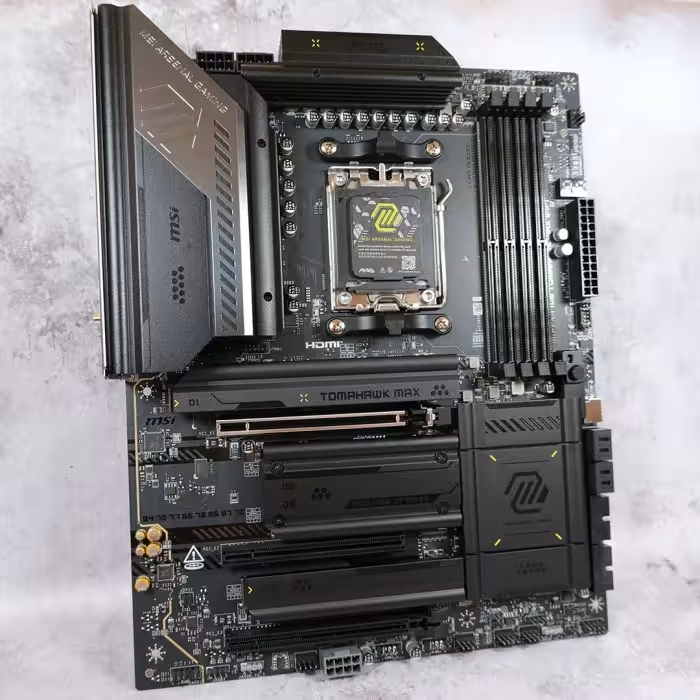
MSI MAG X870E Tomahawk WiFi
A feature-rich, high-end AM5 motherboard from MSI designed for enthusiasts seeking robust connectivity and reliable performance.
How This Score Is Calculated
- Sources analysed: 9 reviews
- Review period: 2025-2026
- Final score: 8.2/10 (rounded)
- Most reviewed featureRear IO / Connectivity (9/9)
- Most praisedUSB 4 & Networking
- Most criticisedLimited Audio & USB 2.0 headers
- Reviewer consensusHigh
- Value for moneyGood Value (7.5/10)
The MSI MAG X870E Tomahawk WiFi is widely regarded as a reliable, high-performance foundation for AM5 enthusiast builds. Reviewers consistently praise its comprehensive connectivity—highlighted by dual USB 4 ports and WiFi 7—and its thoughtful DIY-friendly features. While some note a lack of aesthetic flair and limited internal USB 2.0 headers, it remains a standout choice for those prioritizing function and stability over visual extravagance.
🔧 Key Specifications
- Chipset: AMD X870E
- Power Delivery: 14+2+1 / 14+1+1 phases
- Memory: DDR5 (up to 8400MT/s)
- Storage: 4x M.2 slots (Gen5 and Gen4)
- Networking: WiFi 7, 5-Gigabit LAN
- USB: Dual USB 4 Type-C (40 Gbps)
- PCB: 8-layer server-grade
💲 Price Range
$289.99 - $350.00
Prices fluctuate based on region and variant (Standard vs. PZ).
📊 What Reviewers Say — Feature by Feature
👍 Key Strengths
- Excellent USB 4 and WiFi 7 connectivity
- Robust 14+ phase power delivery
- Convenient tool-less M.2 installation
- Reliable 8-layer server-grade PCB
- Effective Click BIOS X interface
👎 Key Weaknesses
- Limited internal USB 2.0 headers
- Lacklustre 3.5mm audio connectivity
- Minimalist aesthetic may feel plain
- Not fully tool-less for all components
💰 Value for Money Analysis
Reviewers generally view the Tomahawk as a solid mid-to-high-range offering. While some suggest it faces stiff competition in the $350 range, its feature-to-price ratio remains highly competitive.
⚡ Where Reviewers Disagreed
- Aesthetics: 4 reviewers praised the sleek, professional look, while 3 criticised it as boring or lacking personality.
🎯 Who This Product Is For
🛠️ Best Use Cases
- High-Performance Gaming Robust power phases and RAM overclocking support make it suitable for high-end gaming rigs. Great
- Clean-Build Enthusiasts The PZ variant is specifically tailored for cable-free aesthetic builds using compatible cases. Great
🔀 Alternatives Mentioned by Reviewers
- MSI B850 Tomahawk — A budget-friendly alternative that shares similar specifications but lacks the premium X870E chipset features; recommended if you want to save money.
- MSI Carbon Series — Positioned above the Tomahawk, it offers a broader feature set for those needing workstation-level capabilities.
- MSI Gaming Plus Series — A lower-tier alternative from MSI for those who do not require the premium I/O of the X870E Tomahawk.
🛒 Buyer's Guide
✅ Buy This If…
- You need dual USB 4 ports and WiFi 7 for high-speed connectivity.
- You prefer a motherboard with robust tool-less M.2 installation features.
- You are building a high-end AM5 system and want proven, stable performance.
❌ Skip This If…
- You rely heavily on internal USB 2.0 headers for peripherals.
- You require professional-grade integrated audio output.
- You are on a tight budget and don't need the specific X870E chipset features.
⚠️ Things to Check Before Buying
- Ensure you choose the 'PZ' version only if you have a compatible Project Zero case.
- Verify your audio peripheral needs, as the 3.5mm jack selection is limited.
📈 Sentiment Trends Over Time
Reviews span the 2025-2026 cycle. The following shifts were observed:
- Aesthetic Perception — Remains a point of debate, with newer reviews still highlighting the minimalist design as a polarizing factor compared to more visually expressive boards.
The MSI MAG X870E Tomahawk WiFi is a highly capable, feature-rich motherboard that excels in connectivity and DIY ease-of-use. While it lacks the visual flair of some competitors, its consistent performance and robust I/O make it an excellent choice for most AM5 users. If you prioritize function over form, this is a top-tier recommendation for your next build.


Reviewer Perspectives & Source Breakdown
msi mag x870e tomahawk max wifi motherboard review ProsCons...
The MSI MAG X870E TOMAHAWK MAX WiFi is a strong addition to the MSI motherboard line-up. An addition that treads the the line between performance and functionality to a tee. Whether it’s the bountiful rear IO options, support for cooling and fans, M.2 expansion, or the troubleshooting and diagnostic options that streamline PC building, the TOMAHAWK MAX WiFi strikes a near perfect balance and is a great all-round option to consider moving forward.There are some caveats ton consider, however, the lack of USB 2.0 headers and the fact that the board isn’t fully tool-less. While neither of these are particular dealbreakers, their admission does feel like a slight misstep on MSI’s part. Especially when considering, features such as fully tool-less design are rapidly becoming market norms.That being said, the MSI X870E TOMAHAWK MAX WiFi is another solid iteration of the TOMAHAWK design and is a worthy consideration for any PC Build in 2026!
Pros
- ✅ Bountiful rear IO
- ✅ Ample cooling support
- ✅ Diagnosis and troubleshooting tools
Cons
- ❌ Lack of USB 2.0 headers
- ❌ Not entirely tool-less
- ❌ Fairly boring design
msi mag x870e tomahawk wifi motherboard review ProsCons...
The MSI MAG X870E TOMAHAWK WiFi is a solid AMD motherboard for those building a mid-range PC. It offers a decent selection of robust features, such as strong rear IO, which includes fast USB ports and networking options. There’s ample Gen5 compatibility, supporting NVIDIA RTX 5000 graphics cards and lightning-fast storage, and I’d say that the design overall is sophisticated.The most significant caveat overall worth considering is that there’s nothing particularly unique or impressive about the MAG X870E TOMAHAWK WiFi at this price point. This board is similar to the B850 boards we’ve reviewed and other X870 and X870E options, but at $350, it’s not the most competitive option. If you’re looking for something that ‘does the job’, this board is worth picking up. But if you need a motherboard geared more towards workstations or need to have a broader set of features, there are alternatives that will suit your use case.
Pros
- ✅ Sleek black design
- ✅ Robust rear IO
- ✅ Fast networking
Cons
- ❌ Lacklustre audio options
- ❌ Few tool-less features
- ❌ Only two USB 2.0 headers
Page 2 of 2