Logitech MX Master 4 Mouse Review
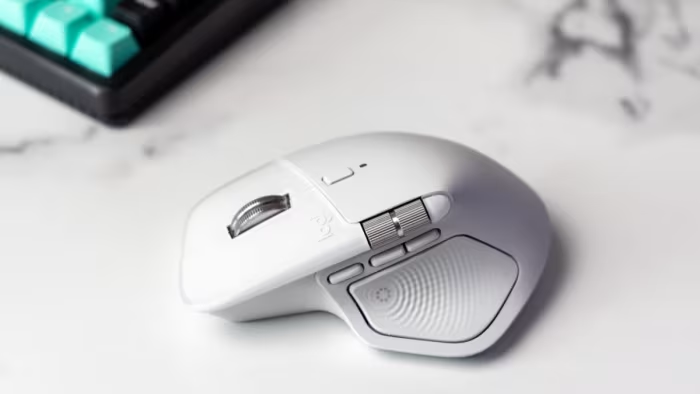
Logitech MX Master 4
A premium flagship wireless productivity mouse featuring innovative haptic feedback and enhanced ergonomic design for professional power users.
How This Score Is Calculated
- Sources analysed: 12 reviews
- Sentiment-only: 12 sources (weighted 1.0×)
- Split: 10 Positive · 2 Mixed · 0 Negative
- Raw weighted average: 8.4
- Consensus bonus +0.3: 85% agreement
- Final score: 8.4/10
Algorithmically calculated from source data. No manual adjustments.
- Most reviewed featureHaptic Feedback (12/12)
- Most praisedErgonomics
- Most criticisedWeight / Software
- Reviewer consensus levelHigh
- Value for moneyFair Value (6.5/10)
The Logitech MX Master 4 is widely regarded as the gold standard for professional productivity, building on the legacy of its predecessors with improved materials and innovative haptic feedback. While it earns praise for its exceptional ergonomics and precision, some reviewers find the new haptic features limited in software support and the mouse itself increasingly heavy. It remains the top choice for power users who prioritize long-term comfort and customizability over portability or gaming performance.
🔧 Key Specifications
- Sensor: High-precision Darkfield (works on glass)
- Connectivity: Wireless (Bolt receiver supported)
- Battery: Excellent life with fast charging
- Buttons: 6 programmable buttons, thumbwheel, Actions Ring
- Build: Durable matte plastic housing
- Weight: Heavier than previous iterations
💲 Price Range
Approximately $120 / 8,400 INR - 10,000 INR
Prices sourced from reviews. Check current retailer pricing.
📊 What Reviewers Say — Feature by Feature
Features evaluated across 12 sources.
👍 Key Strengths
- Exceptional ergonomic shape
- High-precision Darkfield sensor
- Versatile programmable buttons
- Excellent battery life
- Durable matte plastic build
👎 Key Weaknesses
- Heavy chassis
- Limited haptic software support
- High price point
- No included charging cable
- Right-handed only design
💰 Value for Money Analysis
At approximately $120, the MX Master 4 is viewed as a premium investment. While professionals who utilize the mouse for hours daily find the cost justifiable, casual users may struggle to see the value over cheaper alternatives.
8 of 12 sources commented on price or value.
⚡ Where Reviewers Disagreed
The following areas saw meaningful disagreement across sources.
- Build Materials: 5 sources praised the transition to durable matte plastic over rubber, while 3 sources criticized the loss of grip and tactile comfort compared to the MX Master 3.
🎯 Who This Product Is For
Reviewer recommendations for different target audiences and use cases.
🛠️ Best Use Cases
- Productivity & WorkflowThe Actions Ring and multiple programmable buttons allow for significant acceleration of routine software tasks.Great
- GamingThe heavy weight and sensor focus make it unsuitable for high-performance gaming.Poor
🔀 Alternatives Mentioned by Reviewers
The following products were compared directly to the MX Master 4.
- Logitech MX Master 3S — Frequently cited as the primary comparison. Reviewers note it offers similar core performance and superior grip due to its rubberized exterior, often at a better value price point. Choose this if you prefer a grippier texture and don't need the new haptic feedback.
Alternatives sourced exclusively from reviewer mentions.
🛒 Buyer's Guide
✅ Buy This If…
- You are a professional who spends many hours daily on productivity tasks.
- You require advanced customization and programmable buttons to speed up your workflow.
- You want a durable, high-precision mouse that works reliably on glass surfaces.
❌ Skip This If…
- You are a casual user who does not need complex macros.
- You are a gamer who requires a lightweight, fast-tracking mouse.
- You prefer the tactile grip of rubberized surfaces over hard matte plastic.
⚠️ Things to Check Before Buying
- Ensure your software supports the new haptic features, as compatibility is currently limited.
- Be aware that no charging cable is included in the box.
- Consider that the mouse is right-handed only; left-handed users should look elsewhere.
📈 Sentiment Trends Over Time
Reviews indicate a shift in perception regarding build materials:
- Build Quality — While the shift from rubber to matte plastic is seen as more durable, the loss of grip remains a consistent point of contention across all recent reviews.
The Logitech MX Master 4 is an excellent, refined productivity tool that holds its position as the industry leader for professionals. While the haptic feedback is currently a niche feature and the increased weight is noticeable, the overall build, sensor precision, and customization options remain unmatched. It is a highly recommended upgrade for power users seeking a reliable, long-term workstation companion.
Top Alternative: Logitech MX Master 3S — Offers a better tactile grip and similar performance for those who don't prioritize new haptic features.
PLG_CONTENT_IMAGEGALLERY_ERROR_NO_IMAGES
Reviewer Perspectives & Source Breakdown
Logitech MX Master 4 review - Premium mouse with haptic feedback - Noteb...
Price: approx. 8,400 INR
The Logitech MX Master 4 is an excellent, ergonomic productivity mouse offering innovative haptic feedback and high precision. While it has minor software limitations and is on the heavier side, it remains a top-tier choice for professional power users.
Pros
- Excellent ergonomics
- Innovative haptic feedback
- Long battery life
- High precision
Cons
- Haptic feedback limited to specific programs
- Quite heavy
- Lacks charging cable
- Unfinished software
Logitech MX Master 4 review: The best professional mouse - Root-Nation.c...
Price: Approximately 10,000 INR
The Logitech MX Master 4 is a refined flagship productivity mouse that improves upon its predecessor with more durable materials, a better button layout, and enhanced ergonomic design. It remains the gold standard for professionals needing precision and customizability, despite the premium price tag.
Pros
- High-precision Darkfield sensor works on glass surfaces
- Improved durable matte plastic housing resists wear
- Enhanced thumb-button ergonomics and haptic feedback
- Excellent battery life with fast charging support
- Highly customizable buttons via Logi Options+ software
Cons
- Premium price point may deter casual users
- No charging cable included in the box
- Large size may not suit all hand types
Logitech MX Master 4 wireless mouse review: Productivity refined | Techn...
The Logitech MX Master 4 is a premium productivity mouse designed for professionals who spend long hours at their desks.
Pros
- Premium productivity mouse
- Designed for professionals
- Refined productivity experience
Cons
logitech mx master 4 review the biggest update to the best mouse ProsCon...
The MX Master 4 proves that the best mouse for productivity and creativity can indeed get even better. The haptic feedback adds a cool new touch to the experience, while refinements to the build quality and materials make an already-premium product feel even more polished. The Actions Ring might not revolutionize everyone's workflow, but for those who embrace it, it could prove useful. My only real complaint is the price — at around $120, it's a significant investment for a mouse, though one that's likely worth it for professionals and creative users who use their mouse for hours every day.
logitech mx master 4 test premium mouse for productive people ProsCons...
The Logitech MX Master 4 proves to be an excellent mouse for productive users. The shape and size are virtually unchanged compared to its predecessors. Like its predecessors, the MX Master 4 is very comfortable to hold. The six additional buttons, including a haptic sensory control panel, the additional thumbwheel and the new Actions Ring have a positive effect on productive work. The haptic feedback seems interesting, but the added value is not yet clear to us. The design of the mouse is still very discreet. The plastic housing of the MX Master 4 feels very pleasant and appears more durable than the rubberized housing of the MX Master 3. In addition, the mouse offers a fast and precise darkfield sensor, good connectivity, a long battery life and short charging times.
Pros
- ergonomic shape
- additional buttons, additional thumbwheel and new actions ring
- new haptic sensory control panel
- very good material and workmanship quality
Cons
- haptic feedback is only supported by very few applications
logitech mx master 4 review premium mouse with haptic feedback ProsCons...
Pros
- + excellent ergonomics
- + innovative haptic feedback
- + long battery life
- + high precision
Cons
- - haptic feedback only works with certain programs and is limited to the thumb area
- - quite heavy
logitech mx master 4 review the ultimate productivity mouse got even bet...
The Logitech MX Master 4 shines where it belongs—on your desk. Built for productivity, not gaming, its ergonomics, materials, and scroll wheel feel make it a joy to use every day. I’d like a bit more software flexibility and a lighter weight, but overall, Logitech has refined a classic into something excellent.
Pros
- Great ergonomics and build quality
- Superb scroll wheel with adjustable resistance
- Long battery life and reliable sensor
Cons
- Heavy and slightly sluggish when moving quickly
- Limited ability to create custom macros
- Scroll wheel feels a little loose in free position
logitech mx master 4 mouse review my new favorite mouse ProsCons...
Pros
- Another awesome mouse
- Lots of buttons for advanced use/customization
- Smooth scroll wheel
- Comfortable
- Long battery life
Cons
- It’s more expensive than the previous version
- Include the Bolt receiver with the Mac version
logitech mx master 4 review top mac mouse gets innovative haptic feedbac...
The haptic tech may be overkill for many people, but the MX Master 4 still boasts the excellent design and versatile features of its predecessors. The Options+ app also gives users the ability to program their own commands to speed up routine tasks – and you don’t have to turn the mouse upside down to charge it either.
Pros
- Sturdy and comfortable design
- New haptic feedback features
- Two scrolling wheels
- Lots of programmable buttons
Cons
- Right-handed only
- Expensive
- Few apps support haptic technology right now
Page 1 of 2