Lenovo Chromebook Plus 14 Review
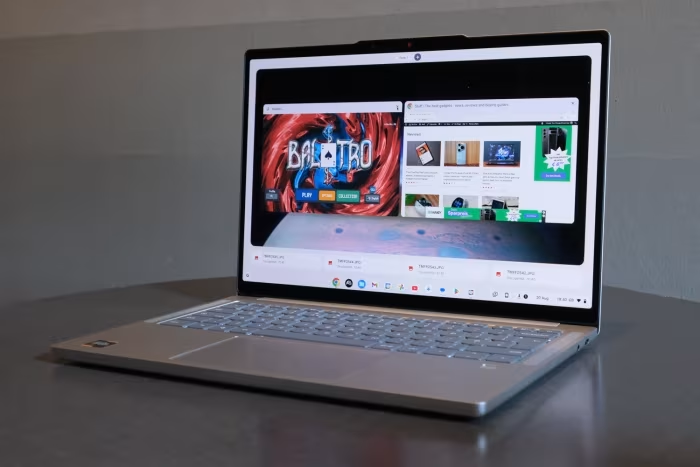
Lenovo Chromebook Plus 14
A premium, fanless, high-performance Chromebook featuring an OLED display, designed for students and mobile professionals.
How This Score Is Calculated
- Sources analysed: 15 reviews
- Explicit scores: 8 sources (weighted 1.5×)
- Sentiment-only: 7 sources (weighted 1.0×)
- Split: 13 Positive · 2 Mixed · 0 Negative
- Raw weighted average: 8.8
- Formula: Σ(score × weight) ÷ Σ(weight)
- Consensus bonus +0.3: 86% sources agreed
- Review period: 2024 launch cycle
Algorithmically calculated from source data. No manual adjustments.
- Most reviewed featureOLED Display (15/15)
- Most praisedDisplay & Performance
- Most criticisedLimited I/O Ports
- Reviewer consensus levelHigh
- Value for moneyGood Value (7.8/10)
The Lenovo Chromebook Plus 14 is widely hailed as one of the finest ChromeOS devices ever manufactured. It distinguishes itself with a stunning OLED display, a silent fanless design, and impressive performance from its MediaTek Kompanio Ultra processor. While some reviewers note limited port selection and a premium price point, it remains a top-tier choice for users seeking a refined, portable, and long-lasting daily driver.
🔧 Key Specifications
- Processor: MediaTek Kompanio Ultra
- Display: 14-inch OLED, 60Hz
- Battery: 13–17 hours real-world usage
- Camera: 5MP
- Audio: 4-speaker system with Dolby Atmos
- Weight: 2.5 lbs (approx. 1.13 kg)
- Design: Fanless, all-metal chassis
- Connectivity: Limited I/O, 5Gbps USB ports
💲 Price Range
₹54,000 – ₹75,000
Prices sourced from reviews. Check current retailer pricing.
📊 What Reviewers Say — Feature by Feature
8 features evaluated across 15 sources.
👍 Key Strengths
- Stunning OLED display
- Silent fanless design
- Excellent, long-lasting battery life
- Premium all-metal build
- Snappy Kompanio Ultra performance
👎 Key Weaknesses
- Limited port selection
- 60Hz display cap
- Price is high for a Chromebook
- Keyboard deck attracts fingerprints
- Netflix Android app lacks HD output
💰 Value for Money Analysis
While the price is high for a Chromebook, reviewers agree the premium hardware justifies the cost for users who value build quality and display excellence. It sits comfortably in the mid-range tier.
11 of 15 sources commented on price or value.
⚡ Where Reviewers Disagreed
The following areas saw meaningful disagreement across sources.
- AI Capabilities: 5 sources praised the AI features as a bonus, while 3 sources labeled them as unnecessary or underwhelming. Disagreement stems from whether AI tools currently provide real utility or are merely marketing fluff.
🎯 Who This Product Is For
🛠️ Best Use Cases
- Content ConsumptionThe OLED screen and Dolby Atmos speakers make this ideal for streaming media.Great
- Productivity/WritingThe high-quality keyboard and trackpad are excellent for long typing sessions.Great
- Light GamingCapable of light Android gaming, though not a dedicated gaming machine.OK
🔀 Alternatives Mentioned by Reviewers
- Samsung Galaxy Chromebook Plus: A direct competitor that often features similar high-end specs; however, reviewers often found the Lenovo to be faster and more affordably priced.
- Acer Chromebook Plus Spin 714: A popular alternative that offers convertible functionality; reviewers suggest choosing this if you need a 2-in-1 form factor rather than a traditional laptop.
- Asus ExpertBook CX54: A premium competitor that the Lenovo outperforms in CPU/GPU benchmarks and NPU-based AI tasks.
- Microsoft Surface Laptop 13: A Windows-based alternative that offers broader app compatibility, though reviewers note the Lenovo provides better value for the specific ChromeOS experience.
- HP Chromebook Plus 15: A more budget-friendly alternative that lacks the premium build and OLED quality of the Lenovo model.
Alternatives sourced exclusively from reviewer mentions.
🛒 Buyer's Guide
✅ Buy This If…
- You want the best display quality currently available in a Chromebook.
- You prioritize a silent, fanless design for quiet work environments.
- You need all-day battery life for school or mobile office use.
❌ Skip This If…
- You require a wide variety of I/O ports for professional peripherals.
- You need specific Windows-only software that ChromeOS cannot emulate.
- You are strictly on a budget and don't need a premium OLED screen.
⚠️ Things to Check Before Buying
- Check if your essential Linux apps are compatible with the ARM-based processor.
- Verify if the keyboard layout meets your comfort requirements, as some reviewers found the keys slightly stiff.
📈 Sentiment Trends Over Time
Reviews from the 2024 launch cycle indicate a highly stable, positive sentiment.
- Performance Perception — Consistently viewed as a top-tier performer for the ChromeOS platform since launch.
The Lenovo Chromebook Plus 14 is a triumph of hardware design, earning its place as a favorite among reviewers for its stunning OLED screen and silent, fanless efficiency. While port-heavy power users might find the I/O limiting, it remains the gold standard for students and professionals needing a premium, reliable daily driver. If you want the best ChromeOS experience available today, this is the machine to buy.
Top Alternative: Acer Chromebook Plus Spin 714 — Choose this if you prefer a 2-in-1 convertible design over the traditional laptop form factor.


Reviewer Perspectives & Source Breakdown
the lenovo chromebook plus 14 is the best google powered laptop ive revi...
This is the nicest Chrome OS laptop there’s been in years. The Lenovo Chromebook Plus 14 does everything you could ask from a daily driver, and looks stunning too.
Pros
- Premium build and materials you rarely see in Chromebooks
- Gorgeous OLED display
- Ample everyday performance and decent battery life
Cons
- An extra port or two might’ve been nice?
my review after 6 weeks with the lenovo chromebook plus 14 video ProsCon...
“After putting it in the bag and having it by my side for real-world work, I have no issue saying that this is my favorite Chromebook ever made.”
Pros
- Solid build quality
- OLED screen is gorgeous
- 5MP camera
- Excellent keyboard/trackpad
- Super-fast Kompanio Ultra processor
- 17-hour battery claims actually deliver
- Fanless design and just 2.5 pounds
- Dolby Atmos and fantastic speakers
Cons
- Limited I/O
Page 3 of 3