Lenovo Chromebook Plus 14 Review
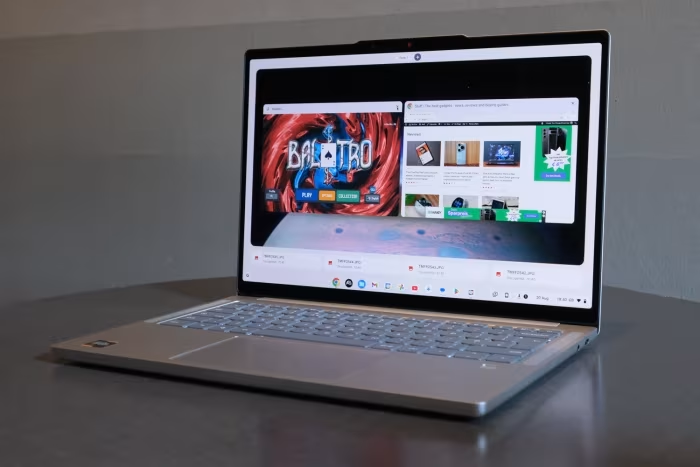
Lenovo Chromebook Plus 14
A premium, fanless, high-performance Chromebook featuring an OLED display, designed for students and mobile professionals.
How This Score Is Calculated
- Sources analysed: 15 reviews
- Explicit scores: 8 sources (weighted 1.5×)
- Sentiment-only: 7 sources (weighted 1.0×)
- Split: 13 Positive · 2 Mixed · 0 Negative
- Raw weighted average: 8.8
- Formula: Σ(score × weight) ÷ Σ(weight)
- Consensus bonus +0.3: 86% sources agreed
- Review period: 2024 launch cycle
Algorithmically calculated from source data. No manual adjustments.
- Most reviewed featureOLED Display (15/15)
- Most praisedDisplay & Performance
- Most criticisedLimited I/O Ports
- Reviewer consensus levelHigh
- Value for moneyGood Value (7.8/10)
The Lenovo Chromebook Plus 14 is widely hailed as one of the finest ChromeOS devices ever manufactured. It distinguishes itself with a stunning OLED display, a silent fanless design, and impressive performance from its MediaTek Kompanio Ultra processor. While some reviewers note limited port selection and a premium price point, it remains a top-tier choice for users seeking a refined, portable, and long-lasting daily driver.
🔧 Key Specifications
- Processor: MediaTek Kompanio Ultra
- Display: 14-inch OLED, 60Hz
- Battery: 13–17 hours real-world usage
- Camera: 5MP
- Audio: 4-speaker system with Dolby Atmos
- Weight: 2.5 lbs (approx. 1.13 kg)
- Design: Fanless, all-metal chassis
- Connectivity: Limited I/O, 5Gbps USB ports
💲 Price Range
₹54,000 – ₹75,000
Prices sourced from reviews. Check current retailer pricing.
📊 What Reviewers Say — Feature by Feature
8 features evaluated across 15 sources.
👍 Key Strengths
- Stunning OLED display
- Silent fanless design
- Excellent, long-lasting battery life
- Premium all-metal build
- Snappy Kompanio Ultra performance
👎 Key Weaknesses
- Limited port selection
- 60Hz display cap
- Price is high for a Chromebook
- Keyboard deck attracts fingerprints
- Netflix Android app lacks HD output
💰 Value for Money Analysis
While the price is high for a Chromebook, reviewers agree the premium hardware justifies the cost for users who value build quality and display excellence. It sits comfortably in the mid-range tier.
11 of 15 sources commented on price or value.
⚡ Where Reviewers Disagreed
The following areas saw meaningful disagreement across sources.
- AI Capabilities: 5 sources praised the AI features as a bonus, while 3 sources labeled them as unnecessary or underwhelming. Disagreement stems from whether AI tools currently provide real utility or are merely marketing fluff.
🎯 Who This Product Is For
🛠️ Best Use Cases
- Content ConsumptionThe OLED screen and Dolby Atmos speakers make this ideal for streaming media.Great
- Productivity/WritingThe high-quality keyboard and trackpad are excellent for long typing sessions.Great
- Light GamingCapable of light Android gaming, though not a dedicated gaming machine.OK
🔀 Alternatives Mentioned by Reviewers
- Samsung Galaxy Chromebook Plus: A direct competitor that often features similar high-end specs; however, reviewers often found the Lenovo to be faster and more affordably priced.
- Acer Chromebook Plus Spin 714: A popular alternative that offers convertible functionality; reviewers suggest choosing this if you need a 2-in-1 form factor rather than a traditional laptop.
- Asus ExpertBook CX54: A premium competitor that the Lenovo outperforms in CPU/GPU benchmarks and NPU-based AI tasks.
- Microsoft Surface Laptop 13: A Windows-based alternative that offers broader app compatibility, though reviewers note the Lenovo provides better value for the specific ChromeOS experience.
- HP Chromebook Plus 15: A more budget-friendly alternative that lacks the premium build and OLED quality of the Lenovo model.
Alternatives sourced exclusively from reviewer mentions.
🛒 Buyer's Guide
✅ Buy This If…
- You want the best display quality currently available in a Chromebook.
- You prioritize a silent, fanless design for quiet work environments.
- You need all-day battery life for school or mobile office use.
❌ Skip This If…
- You require a wide variety of I/O ports for professional peripherals.
- You need specific Windows-only software that ChromeOS cannot emulate.
- You are strictly on a budget and don't need a premium OLED screen.
⚠️ Things to Check Before Buying
- Check if your essential Linux apps are compatible with the ARM-based processor.
- Verify if the keyboard layout meets your comfort requirements, as some reviewers found the keys slightly stiff.
📈 Sentiment Trends Over Time
Reviews from the 2024 launch cycle indicate a highly stable, positive sentiment.
- Performance Perception — Consistently viewed as a top-tier performer for the ChromeOS platform since launch.
The Lenovo Chromebook Plus 14 is a triumph of hardware design, earning its place as a favorite among reviewers for its stunning OLED screen and silent, fanless efficiency. While port-heavy power users might find the I/O limiting, it remains the gold standard for students and professionals needing a premium, reliable daily driver. If you want the best ChromeOS experience available today, this is the machine to buy.
Top Alternative: Acer Chromebook Plus Spin 714 — Choose this if you prefer a 2-in-1 convertible design over the traditional laptop form factor.


Reviewer Perspectives & Source Breakdown
Lenovo Chromebook Plus 14 Gen 10 review: Heir to the Pixelbook throne | ...
Price: Approximately ₹54,000
The Lenovo Chromebook Plus 14 Gen 10 is a premium, high-performance device that serves as a worthy successor to the Pixelbook line. With its stunning OLED screen and powerful ARM-based chip, it sets a new standard for Chromebook quality.
Pros
- Stylish and lightweight design
- Superb OLED display
- Class-leading performance
- Excellent AI capabilities
Cons
- Limited port selection
- Screen resolution could be higher
Lenovo Chromebook Plus 14 review: the new king of Chromebooks | The Verg...
Price: ₹54,000 - ₹62,500
The Lenovo Chromebook Plus 14 is an excellent, high-performance laptop featuring a standout OLED display and impressive battery life. It offers superior value and speed compared to its main competitors in the premium Chromebook market.
Pros
- Beautiful OLED screen
- Marathon battery life
- Speedy performance with fanless design
- Good-sounding speakers
Cons
- USB ports limited to 5Gbps
- Trackpad click is slightly loud
- Webcam occasionally exhibits green color cast
- ChromeOS app compatibility can be frustrating
Lenovo Chromebook Plus 14 Review (with Mediatek Kompanio Ultra 910) - Lo...
Price: Approximately ₹54,000 to ₹63,000
The Lenovo Chromebook Plus 14 is a surprisingly capable and quiet device, offering excellent battery life and snappy performance. It is a strong choice for those seeking a portable machine for productivity and light gaming.
Pros
- Fanless, silent design
- Impressive 13+ hour battery life
- Solid, mostly metal chassis
- Snappy performance with MediaTek processor
- Bright, sharp OLED touchscreen
Cons
- Keyboard deck has slight flex
- Limited port selection
- Netflix Android app lacks HD output
- Underwhelming built-in AI tools
- Shallow keyboard key travel
My review after 6 weeks with the Lenovo Chromebook Plus 14 [VIDEO] - chr...
Price: Approximately ₹54,500 - ₹63,000
The Lenovo Chromebook Plus 14 is the reviewer's favorite Chromebook ever made, offering a perfect blend of high-end performance, an stunning OLED screen, and exceptional battery life. It excels as a portable, fanless work machine that handles multitasking and Android apps with ease.
Pros
- Solid build quality
- Gorgeous OLED screen
- High-quality 5MP camera
- Excellent keyboard and trackpad
- Super-fast Kompanio Ultra processor
- Impressive 17-hour battery life
- Fanless design and lightweight
- Fantastic Dolby Atmos speakers
Cons
- Limited I/O ports
Lenovo Chromebook Plus 14 Review: A Game-Changer | WIRED - wired.com...
Price: Approximately ₹58,500 (based on $699 USD)
The Lenovo Chromebook Plus 14 is arguably the best Chromebook ever made, offering premium build quality, a stunning OLED screen, and impressive performance. It successfully bridges the gap between high-end Windows laptops and budget-focused ChromeOS devices.
Pros
- Stunning OLED screen, premium build, great performance, excellent battery life.
Cons
- Limited port selection and hinge is difficult to open.
Lenovo Chromebook Plus 14 review: Simply the best | Tom's Guide - tomsgu...
Price: Approximately ₹54,500 (based on $649 conversion)
The Lenovo Chromebook Plus 14 is the best Chromebook available, offering a premium design, stunning OLED display, and excellent performance. Its integration of AI tools and robust battery life makes it a standout choice for students and professionals alike.
Pros
- Premium build, stellar ergonomics, mesmerizing OLED display, strong AI features.
Cons
- The $649 price point is relatively high for Chromebooks.
Lenovo Chromebook Plus 14 (Gen 10) review | IT Pro - itpro.com...
The Lenovo Chromebook Plus 14 is a high-performance, AI-ready device that sets a new standard for Chromebooks with its impressive chipset and vibrant OLED display. It delivers premium features at a mid-range price, making it a top contender in its class.
Pros
- Stylish, slim design
- Strong CPU and GPU performance
- Powerful AI-ready NPU
- Bright OLED screen
Cons
- Lower screen resolution
- Battery life trails top-tier Copilot+ PCs
Lenovo Chromebook Plus 14 review: This fanless gem lasts 15+ hours with ...
The Lenovo Chromebook Plus 14 offers excellent battery life, a sharp webcam, and a vibrant OLED display in a quiet, fanless design. While its performance is impressive, it is held back by lackluster speakers, a 60Hz screen, and a premium price point.
Pros
- Bright, vibrant OLED display
- Excellent battery life
- Lightweight, fanless design
- Sharp, accurate webcam
Cons
- Lackluster speakers
- Finicky touchpad
- Display capped at 60Hz
- High price tag
Lenovo Chromebook Plus 14 review: MediaTek's new power play...
Pros
- + excellent MediaTek Kompanio Ultra performance
- + excellent battery life
- + good sound from four speakers
- + completely silent thanks to passive cooling
- + high-quality and slim chassis
Cons
- - gets noticeably warm on the bottom under heavy load
- - highly reflective screen
- - ARM architecture can cause limitations with specific Linux apps
- - keyboard and palm rest attract fingerprints
Page 2 of 3