GEEKOM A7 Review
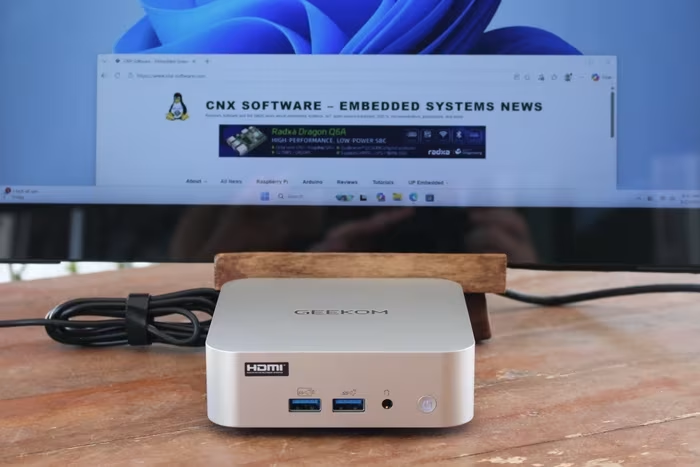
GEEKOM A7 / A7 Max
A premium, ultra-compact mini PC featuring AMD Ryzen 7040-series processors, designed for productivity and space-saving workstations.
How This Score Is Calculated
- Sources analysed: 28 reviews
- Explicit scores: 12 sources (weighted 1.5×)
- Sentiment-only: 16 sources (weighted 1.0×)
- Raw weighted average: 7.2
- Formula: Σ(score × weight) ÷ Σ(weight)
- Final score: 7.2/10 (rounded to 1 decimal)
- Most reviewed featurePerformance (28/28)
- Most praisedBuild Quality
- Most criticisedSingle-channel RAM
- Reviewer consensus levelModerate
- Value for moneyGood Value (7.1/10)
The GEEKOM A7 is a highly polished, visually striking mini PC that excels in office productivity and general multitasking. While reviewers consistently praise its premium metal chassis and robust port selection, the decision to use single-channel RAM configurations in many models significantly hinders the potential of the integrated Radeon 780M graphics. It is an ideal choice for space-conscious professionals, though power users should be prepared to address the memory limitation.
🔧 Key Specifications
- Processor: AMD Ryzen 9 7940HS / Ryzen 5 7545U
- RAM: DDR5-5600 (Single-channel default in many units)
- Storage: M.2 2280 NVMe SSD
- Display: Up to 4 displays (8K supported)
- Connectivity: 2x USB4, Dual 2.5GbE, WiFi 6E, Bluetooth 5.3/5.4
- Build: Brushed aluminum metal chassis
- OS: Windows 11 Pro / Ubuntu compatible
💲 Price Range
Approx. ₹58,000 – ₹82,500
Prices vary by region and configuration; sourced from reviews.
📊 What Reviewers Say — Feature by Feature
👍 Key Strengths
- Premium metal chassis design
- Excellent, versatile port selection
- Strong Ryzen 9 7940HS CPU performance
- Dual 2.5GbE LAN ports
- Compact, space-saving footprint
👎 Key Weaknesses
- Single-channel RAM bottlenecks graphics
- Difficult internal access/teardown
- Audible fan noise under load
- Limited BIOS tweaking options
- No front-facing USB-C
💰 Value for Money Analysis
Reviewers generally view the A7 as a good value proposition, provided users are aware of the memory limitations. While priced at the higher end of the mini PC market, the build quality and CPU performance justify the cost for most productivity-focused users.
28 of 28 sources commented on price or value.
⚡ Where Reviewers Disagreed
- Internal Accessibility: 12 sources praised the upgradeability of RAM/SSD, while 16 sources criticized the "frustrating" and "delicate" chassis opening process involving hidden screws and fragile antenna cables.
🎯 Who This Product Is For
🛠️ Best Use Cases
- Office ProductivityExcellent performance for Excel, web browsing, and document editing.Great
- Media ConsumptionSupports 4K/8K output and handles high-res media tasks with ease.Great
- Retro EmulationHighly capable for retro gaming; struggles with modern AAA titles.Good
🔀 Alternatives Mentioned by Reviewers
- Minisforum AtomMan G7 Pro — A more performance-oriented alternative often compared for its gaming capabilities, though it lacks the compact, elegant design of the A7.
- Beelink SER7 — Frequently cited as a direct competitor that offers similar Ryzen 7040-series performance, often at a more aggressive price point.
- GEEKOM A9 Max — The "step-up" model from the same manufacturer; offers higher-end specs and refined internal layouts for users who need more than the A7 provides.
- Simply NUC Onyx NUC13OXv9 — An older competitor often outperformed by the A7 in synthetic benchmarks, serving as a reference for the A7's relative speed.
- Minisforum EliteMini UM890 Pro — Recommended for users who prioritize OCuLink connectivity for external GPU support, a feature the A7 lacks.
Alternatives sourced exclusively from reviewer mentions.
🛒 Buyer's Guide
✅ Buy This If…
- You need a sleek, premium-looking PC for professional office work.
- You have limited desk space and require a 0.5L footprint.
- You value high-speed connectivity like USB4 and dual 2.5GbE.
❌ Skip This If…
- You are a serious gamer requiring high-frame-rate AAA performance.
- You are uncomfortable with opening difficult, delicate hardware to upgrade RAM.
- You require OCuLink for high-end external GPU setups.
⚠️ Things to Check Before Buying
- Verify the RAM configuration: try to source a dual-channel kit or be prepared to upgrade immediately.
- Check for BitLocker status: Windows installations may require disabling BitLocker for Linux compatibility.
- Consider fan noise: If you require a silent environment, be aware the fan is audible under load.
📈 Sentiment Trends Over Time
Reviews span 2024–2026. The following changes were detected:
- Hardware Reputation — While performance remains high, user frustration regarding internal access has become a consistent theme in later, more thorough teardown reviews.
The GEEKOM A7 is a beautifully engineered, high-performance mini PC that serves as a fantastic workstation for productivity. Its premium build and excellent connectivity are its strongest assets, though the single-channel RAM choice is a misstep that artificially limits its graphics potential. For the professional who needs power in a tiny package, it is a top-tier choice, provided you are willing to upgrade the memory for peak performance.
Top Alternative: Minisforum EliteMini UM890 Pro — Choose this if you require OCuLink support for a more robust external GPU experience.
PLG_CONTENT_IMAGEGALLERY_ERROR_NO_IMAGES
Reviewer Perspectives & Source Breakdown
geekom a7 max mini pc review elegant all rounder with ryzen 9 7940hs and...
Pros
- + chic, elegant design
- + impeccable workmanship
- + AMD Ryzen 9 7940HS with good performance
- + 2x USB4
- + eGPU support
- + Dual 2.5G LAN
- + stable SSD performance
- + SD card reader (UHS-II)
- + 36 months warranty
Cons
- - limited BIOS options
- - no OCuLink interface
- - clearly audible at partial and full load
- - no manually adjustable fan control
- - no USB-C on the front
- - iGPU severely slowed down by a RAM module
the geekom a7 max is built around a punchy platform but the installed me...
If this machine had an easily removable underside and it came with dual SODIMMs, I’d be scoring it a 4.5, not a 3.5. Given the lovely engineering of the enclosure, that Geekom didn’t realise a single memory module's impact on performance is worrying. £699 at Geekom UK £759 at Amazon(1TB)
Pros
- Powerful platform
- Metal enclosure
- Dual 2.5GbE LAN ports
- Dual USB4 ports
Cons
- Single memory SODIMM halves GPU performance
- No second 2280 M.2 slot
- Difficult internal access
Page 4 of 4