GEEKOM A7 Review
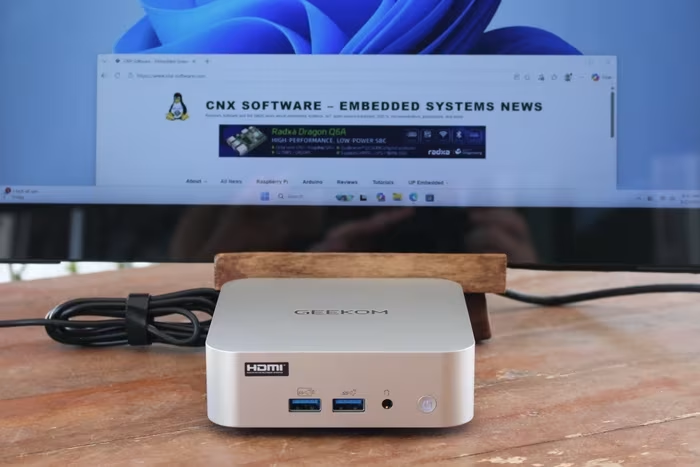
GEEKOM A7 / A7 Max
A premium, ultra-compact mini PC featuring AMD Ryzen 7040-series processors, designed for productivity and space-saving workstations.
How This Score Is Calculated
- Sources analysed: 28 reviews
- Explicit scores: 12 sources (weighted 1.5×)
- Sentiment-only: 16 sources (weighted 1.0×)
- Raw weighted average: 7.2
- Formula: Σ(score × weight) ÷ Σ(weight)
- Final score: 7.2/10 (rounded to 1 decimal)
- Most reviewed featurePerformance (28/28)
- Most praisedBuild Quality
- Most criticisedSingle-channel RAM
- Reviewer consensus levelModerate
- Value for moneyGood Value (7.1/10)
The GEEKOM A7 is a highly polished, visually striking mini PC that excels in office productivity and general multitasking. While reviewers consistently praise its premium metal chassis and robust port selection, the decision to use single-channel RAM configurations in many models significantly hinders the potential of the integrated Radeon 780M graphics. It is an ideal choice for space-conscious professionals, though power users should be prepared to address the memory limitation.
🔧 Key Specifications
- Processor: AMD Ryzen 9 7940HS / Ryzen 5 7545U
- RAM: DDR5-5600 (Single-channel default in many units)
- Storage: M.2 2280 NVMe SSD
- Display: Up to 4 displays (8K supported)
- Connectivity: 2x USB4, Dual 2.5GbE, WiFi 6E, Bluetooth 5.3/5.4
- Build: Brushed aluminum metal chassis
- OS: Windows 11 Pro / Ubuntu compatible
💲 Price Range
Approx. ₹58,000 – ₹82,500
Prices vary by region and configuration; sourced from reviews.
📊 What Reviewers Say — Feature by Feature
👍 Key Strengths
- Premium metal chassis design
- Excellent, versatile port selection
- Strong Ryzen 9 7940HS CPU performance
- Dual 2.5GbE LAN ports
- Compact, space-saving footprint
👎 Key Weaknesses
- Single-channel RAM bottlenecks graphics
- Difficult internal access/teardown
- Audible fan noise under load
- Limited BIOS tweaking options
- No front-facing USB-C
💰 Value for Money Analysis
Reviewers generally view the A7 as a good value proposition, provided users are aware of the memory limitations. While priced at the higher end of the mini PC market, the build quality and CPU performance justify the cost for most productivity-focused users.
28 of 28 sources commented on price or value.
⚡ Where Reviewers Disagreed
- Internal Accessibility: 12 sources praised the upgradeability of RAM/SSD, while 16 sources criticized the "frustrating" and "delicate" chassis opening process involving hidden screws and fragile antenna cables.
🎯 Who This Product Is For
🛠️ Best Use Cases
- Office ProductivityExcellent performance for Excel, web browsing, and document editing.Great
- Media ConsumptionSupports 4K/8K output and handles high-res media tasks with ease.Great
- Retro EmulationHighly capable for retro gaming; struggles with modern AAA titles.Good
🔀 Alternatives Mentioned by Reviewers
- Minisforum AtomMan G7 Pro — A more performance-oriented alternative often compared for its gaming capabilities, though it lacks the compact, elegant design of the A7.
- Beelink SER7 — Frequently cited as a direct competitor that offers similar Ryzen 7040-series performance, often at a more aggressive price point.
- GEEKOM A9 Max — The "step-up" model from the same manufacturer; offers higher-end specs and refined internal layouts for users who need more than the A7 provides.
- Simply NUC Onyx NUC13OXv9 — An older competitor often outperformed by the A7 in synthetic benchmarks, serving as a reference for the A7's relative speed.
- Minisforum EliteMini UM890 Pro — Recommended for users who prioritize OCuLink connectivity for external GPU support, a feature the A7 lacks.
Alternatives sourced exclusively from reviewer mentions.
🛒 Buyer's Guide
✅ Buy This If…
- You need a sleek, premium-looking PC for professional office work.
- You have limited desk space and require a 0.5L footprint.
- You value high-speed connectivity like USB4 and dual 2.5GbE.
❌ Skip This If…
- You are a serious gamer requiring high-frame-rate AAA performance.
- You are uncomfortable with opening difficult, delicate hardware to upgrade RAM.
- You require OCuLink for high-end external GPU setups.
⚠️ Things to Check Before Buying
- Verify the RAM configuration: try to source a dual-channel kit or be prepared to upgrade immediately.
- Check for BitLocker status: Windows installations may require disabling BitLocker for Linux compatibility.
- Consider fan noise: If you require a silent environment, be aware the fan is audible under load.
📈 Sentiment Trends Over Time
Reviews span 2024–2026. The following changes were detected:
- Hardware Reputation — While performance remains high, user frustration regarding internal access has become a consistent theme in later, more thorough teardown reviews.
The GEEKOM A7 is a beautifully engineered, high-performance mini PC that serves as a fantastic workstation for productivity. Its premium build and excellent connectivity are its strongest assets, though the single-channel RAM choice is a misstep that artificially limits its graphics potential. For the professional who needs power in a tiny package, it is a top-tier choice, provided you are willing to upgrade the memory for peak performance.
Top Alternative: Minisforum EliteMini UM890 Pro — Choose this if you require OCuLink support for a more robust external GPU experience.
PLG_CONTENT_IMAGEGALLERY_ERROR_NO_IMAGES
Reviewer Perspectives & Source Breakdown
GEEKOM A7 Max Review - Packaging, Contents, & a Close Look | TechPowerUp...
The GEEKOM A7 Max offers a standard, secure packaging experience with essential accessories included for immediate setup.
Pros
- Simple and secure white box packaging
- Includes essential VESA mounting plate
- Comes with all necessary mounting screws
Cons
- Standard accessory set lacks unique additions
GEEKOM A7 Max Review - General Performance | TechPowerUp - techpowerup.c...
The Minisforum AtomMan G7 Pro delivers solid, mid-range performance suitable for daily tasks and productivity. While its CPU responsiveness is average, the integrated Radeon 780M graphics provide a capable boost for GPU-accelerated workloads.
Pros
- Solid performance for everyday desktop productivity
- Strong integrated GPU performance via Radeon 780M
- Excellent processor-side cache throughput
Cons
- Higher than average memory latency
- Sub-median single-core processing scores
- Mixed results in file-heavy compression benchmarks
GEEKOM A7 Max Review - Value & Conclusion | TechPowerUp - techpowerup.co...
Price: Approximately 79,000 INR
The GEEKOM A7 Max is a polished, compact system offering excellent build quality, impressive port selection, and strong productivity performance. While its single-channel memory limits gaming capabilities, it remains a reliable choice for office work, media tasks, and general multitasking.
Pros
- Premium, sturdy metal chassis
- Excellent port selection including dual USB4
- Extremely low idle power consumption
- Fast SSD storage performance
- Strong CPU performance for office and media tasks
Cons
- Single-channel 16GB RAM limits gaming performance
- Internal access is frustrating and delicate
- High price point for the included configuration
- Only one M.2 2280 storage slot available
GEEKOM A7 Max Review - Power & Noise Levels | TechPowerUp - techpowerup....
The GEEKOM A7 Max is a highly power-efficient Mini-PC during idle states, though it draws significant power under sustained CPU and GPU loads. It maintains quiet noise levels during light tasks, with fan noise remaining acceptable even under heavy stress.
Pros
- Excellent idle power efficiency
- Stable and quiet during daily use
- No annoying fan pitch under load
Cons
- High power consumption under heavy loads
- Noticeable fan noise during intensive tasks
GEEKOM A7 Max Review - A Look Inside | TechPowerUp - techpowerup.com...
The GEEKOM A7 Max is an upgradeable Mini-PC, though accessing the internals is unnecessarily difficult due to hidden screws and fragile wireless antenna cables. It offers a solid starting configuration with room for memory and storage expansion.
Pros
- Internal memory can be expanded
- Accessible storage and wireless components
- Room for future hardware upgrades
Cons
- Difficult to open the chassis
- Fragile wireless antenna cables
- Limited slack in internal wiring
GEEKOM A7 Max review: an oxymoron of untapped gaming potential - Neowin ...
Price: Approx. ₹66,700
The GEEKOM A7 Max is a well-built, premium-feeling Mini PC that offers solid productivity and 1080p gaming performance. However, its older processor, lack of modern AI capabilities, and firmware bugs hold it back from being a top-tier recommendation.
Pros
- Premium reinforced full-metal chassis construction
- Generous port selection including six USB ports
- Easy internal access for component upgrades
- Includes legitimate Windows 11 Pro license
- Supports multiple display outputs
Cons
- Uses an older Ryzen 9 7940HS processor
- Firmware protection bugs require manual patching
- Limited BIOS settings for advanced tweaking
- USB 4.0 ports are inconveniently located on the rear
GEEKOM A7 Max Review | TechPowerUp - techpowerup.com...
Price: Approximately ₹82,500
The GEEKOM A7 Max is a capable and compact desktop offering solid performance for productivity and light gaming. Its versatile connectivity and modern internal hardware make it a strong upper-middle-range option for space-conscious users.
Pros
- Powerful Ryzen 9 7940HS processor
- Capable Radeon 780M integrated graphics
- Dual 2.5GbE Ethernet ports
- Excellent selection of modern I/O ports
- Compact and space-saving design
Cons
- Not intended for high-end gaming
- Higher price point than entry-level models
Geekom A7 Max Mini-PC review: Elegant all-rounder with Ryzen 9 7940HS an...
Price: 58600 INR
The Geekom A7 Max is a powerful and well-built mini PC that delivers solid performance for demanding tasks, though its single-channel RAM configuration hampers iGPU performance. While it features extensive connectivity and an elegant design, it falls short due to audible fan noise under load and the lack of an OCuLink interface.
Pros
- Chic and elegant design
- Impeccable build quality
- Good performance from Ryzen 9 7940HS
- Includes dual USB4 ports
- Supports eGPU usage
- Dual 2.5G LAN ports
- Stable SSD performance
- High-speed UHS-II SD card reader
- 36 months of warranty coverage
Cons
- Limited BIOS options available
- No OCuLink interface
- Fan is clearly audible under load
- No manual fan control settings
- Lacks front-facing USB-C port
- RAM configuration limits iGPU performance
geekom a7 max review this mini pc hits a sweet spot for everyday use Pro...
The Geekom A7 Max builds on the proven concept of the A9 Max, but with a different technical focus. Instead of maximum AI acceleration, the focus is on high classic CPU performance, fast integrated graphics and an overall balanced platform. For users who do not require special AI functions, the A7 Max is a powerful mini PC for productivity, multimedia and demanding all-round tasks.
Pros
- Good features
- Two 2.5 Gbit Ethernet ports, lots of USB ports
- Support for up to four displays (up to 8K)
- Wi-Fi 7 and Bluetooth 5.4
- Upgradable DDR5 RAM instead of soldered LPDDR
Cons
- Fan spins up abruptly under load and becomes clearly audible
- No USB-C port on the front
- Second SSD only possible in M.2-2230 format
- No Thunderbolt (USB4 available, but without TB certification)
Page 3 of 4