Onyx Boox Tab Ultra Review
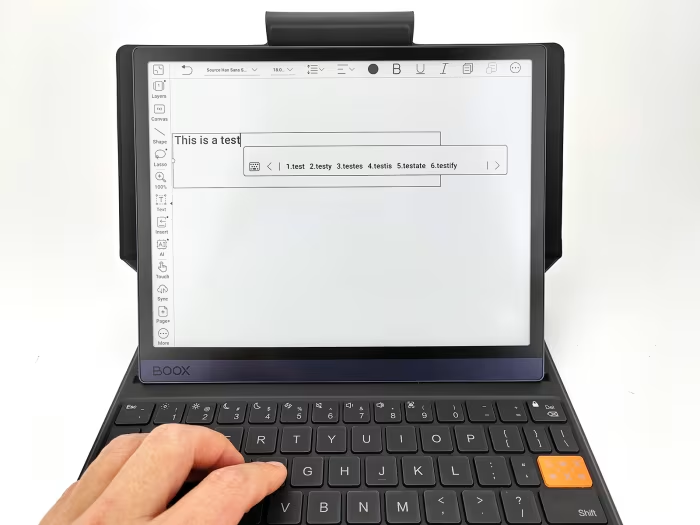
Onyx Boox Tab Ultra / Tab Ultra C
A versatile, Android-powered E Ink tablet designed for focused productivity, note-taking, and document management.
How This Score Is Calculated
- Sources analysed: 6 reviews
- Explicit scores: 0 sources
- Sentiment-only: 6 sources (weighted 1.0×)
- Split: 3 Positive · 2 Mixed · 1 Negative
- Raw weighted average: 6.8
- Formula: Σ(score × weight) ÷ Σ(weight)
- Most reviewed featureAndroid OS (6/6)
- Most praisedNote-taking/Stylus
- Most criticisedHigh Price
- Reviewer consensus levelModerate
- Value for moneyOverpriced (4.0/10)
The Onyx Boox Tab Ultra is a powerful, niche E Ink tablet that bridges the gap between traditional ereaders and functional Android tablets. It shines as a distraction-free tool for professionals and students who prioritize document editing and note-taking. However, its high price tag and the inherent limitations of Android apps on E Ink screens make it a polarizing choice that falls short for general media users.
🔧 Key Specifications
- Display: 10.3-inch Kaleido 3 (Color) or E Ink (Monochrome)
- Battery: 6,300mAh
- OS: Android 11
- Storage: Expandable up to 1TB
- Stylus: Pen2 Pro (4,096 pressure levels)
- Security: Fingerprint sensor in power button
💲 Price Range
Approximately ₹49,500 – ₹58,000
📊 What Reviewers Say — Feature by Feature
👍 Key Strengths
- Excellent note-taking and stylus responsiveness
- Versatile Android OS with Play Store access
- Stunning eye-friendly 10.3-inch display
- Expandable storage up to 1TB
- Long-lasting 6,300mAh battery
👎 Key Weaknesses
- Very high price point
- Android apps often unoptimized for E Ink
- Occasional system lag and ghosting
- Keyboard case sold separately
- Poor camera quality
💰 Value for Money Analysis
Reviewers generally agree that the Tab Ultra is an expensive luxury. While feature-rich, its value proposition is challenged by lower-cost alternatives like the Boox Note Air 3 C or focused devices like the Remarkable 2.
⚡ Where Reviewers Disagreed
- Performance: 2 sources praised its speed, while 2 sources specifically cited lag, ghosting, and sluggishness as major drawbacks.
🎯 Who This Product Is For
🛠️ Best Use Cases
- Note-taking: Excellent for handwriting with a highly responsive stylus. Great
- Reading PDFs/Comics: The color screen and size make it perfect for technical documents. Great
- General App Usage: Often laggy and poorly optimized for E Ink. Poor
🔀 Alternatives Mentioned by Reviewers
- Boox Note Air 3 C: Recommended as a better value proposition that offers most of the same features for a significantly lower price.
- iPad (10.9-inch): Suggested for users who prioritize color, app performance, and general media consumption over E Ink readability.
- Kobo Elipsa 2E: A more cost-effective, streamlined alternative for users who do not require color and prefer a dedicated note-taking focus.
- Remarkable 2 / Kindle Scribe: Cited as more focused, simplified, and affordable alternatives for pure note-taking and reading.
- Samsung Galaxy Tab S9: Mentioned as the standard for performance-heavy tasks, media, and gaming, which the Boox is not intended to replace.
🛒 Buyer's Guide
✅ Buy This If…
- You need a distraction-free, E Ink-based device for professional document annotation.
- You value the ability to install specific Android apps for productivity.
- You prefer an eye-friendly display over high-performance screen refresh rates.
❌ Skip This If…
- You want a general-purpose tablet for streaming video or high-end gaming.
- You are on a budget and don't need color E Ink capabilities.
- You are easily frustrated by software lag or unoptimized interface elements.
📈 Sentiment Trends Over Time
- Software: Persistent criticism regarding the dated Android 11 OS and lack of app optimization across all reviews.
The Onyx Boox Tab Ultra is a specialized powerhouse that excels at professional reading and handwriting tasks. While its color screen is a major highlight, the high price and inconsistent software performance keep it from being a universal recommendation. If you are a power user who needs a professional E Ink tool, it is a strong contender; otherwise, consider more budget-friendly alternatives.
PLG_CONTENT_IMAGEGALLERY_ERROR_NO_IMAGES
Reviewer Perspectives & Source Breakdown
ONYX BOOX Tab Ultra Hands-on Review: E-Ink Tablet Made for Productivity ...
The ONYX BOOX Tab Ultra is a highly productive e-ink tablet featuring an excellent typing experience and long battery life. While software limitations exist, it stands out as a distraction-free device ideal for business and note-taking.
Pros
- Exceptionally satisfying and clicky keyboard cover
- Fast display responsiveness for an e-ink device
- Excellent battery life lasting a full week
- Versatile Android OS with Google Play Store access
- High-quality stereo speaker system
Cons
- Weak magnetic connection when used on laps
- Cannot easily combine handwritten and typed text
- Restrictive 50,000-word limit in notebook app
- Keyboard case hinge angle is not adjustable
Onyx Boox Tab Ultra C review: this ereader’s color screen is its only re...
Price: Approximately ₹49,500
The Onyx Boox Tab Ultra C offers a welcome color display for reading comics and PDFs but is held back by slow performance, significant ghosting, and poor battery life. It is an expensive device that fails to deliver a smooth user experience.
Pros
- Adds color to the ereader experience
- Expandable storage up to 1TB
- Excellent PDF editing experience
- Access to Google Play Store
Cons
- Heavy and bulky device
- Mediocre battery life
- Slow and laggy performance
- Dated Android 11 operating system
Onyx Boox Tab Ultra C review: The most flexible e-ink tablet | Expert Re...
Price: Approximately ₹58,000
The Onyx Boox Tab Ultra C is a highly flexible e-ink tablet that excels as a note-taker and document reader, but its high price and unnecessary Android complexity make it a niche choice compared to simpler rivals. It offers excellent build quality and color screen capabilities, though performance with standard Android apps is hampered by e-ink limitations.
Pros
- Excellent build quality
- Fast performance
- Ability to doodle in colour
Cons
- Extremely expensive
- Android adds unnecessary complexity
- Android apps aren't built for e-ink
Onyx Boox Tab Ultra C review: The best E Ink tablet, now in color | Andr...
Price: Approximately ₹50,000
The Onyx Boox Tab Ultra C is a powerful, distraction-free E Ink tablet that excels at reading, writing, and research. While it offers versatile Android functionality, it is not a direct replacement for a full-fledged high-performance Android tablet.
Pros
- Stunning eye-friendly 10.3-inch Kaleido 3 E Ink display
- Responsive Pen2 Pro stylus with 4,096 pressure levels
- Versatile Android 11 OS with Google Play Store
- Convenient fingerprint sensor in the power button
- Long-lasting 6,300mAh battery
- Slim and lightweight design
Cons
- No IP rating for water or dust resistance
- Keyboard case is sold separately
- Not all Android apps are optimized for E Ink
- Performance is not as snappy as standard tablets
Onyx Boox Tab Ultra review | Android Central - androidcentral.com...
Price: Approximately ₹50,000
The Onyx Boox Tab Ultra is a highly versatile, Android-powered E Ink tablet that excels at reading and note-taking. While it is expensive and requires extra purchases for accessories, its ability to run diverse apps makes it a top-tier choice in its category.
Pros
- Stylus is included in the box
- Display looks great
- Keyboard Cover is comfortable to type on
- Runs Android with Play Store access
- Stylus is highly responsive in Notes app
Cons
- Pretty darn expensive
- Keyboard Cover sold separately
- Not all Android apps are worth using
- Occasional system lag
Onyx Boox Tab Ultra C Pro - Review 2024 - PCMag Middle East - me.pcmag.c...
Price: Approximately 54,000 INR
The Onyx Boox Tab Ultra C Pro is a solid E Ink tablet for reading and note-taking with a high-quality color screen. However, its high price point makes it less competitive compared to alternatives that offer a similar experience for less money.
Pros
- Large color E Ink screen
- Thin and light design
- Supports third-party apps via Google Play
Cons
- Expensive
- Poor camera quality
- Mediocre speaker quality