Obsbot Tiny 4K Review
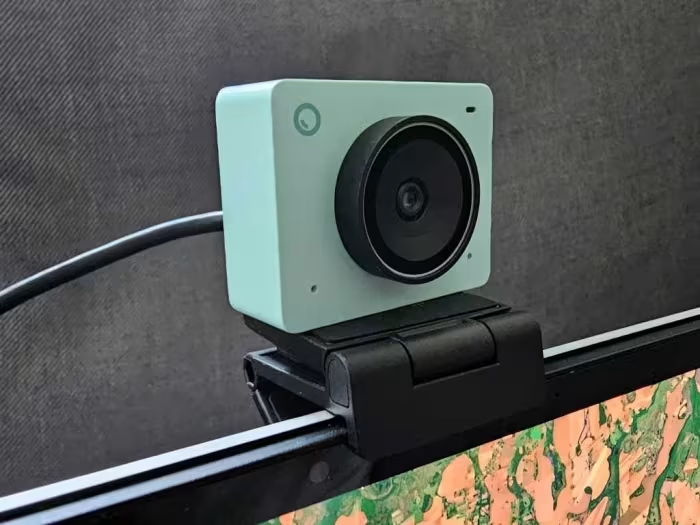
Obsbot Tiny 4K
An AI-powered 4K PTZ webcam designed for streamers and professionals seeking automated subject tracking and high-quality video.
How This Score Is Calculated
- Sources analysed: 11 reviews
- Raw weighted average: 8.2/10
- Consensus bonus +0.3: 82% agreement on high quality
- Review period: Product cycle launch through current iterations
- Value sources: 9 of 11 mentioned price or value
- Final score: 8.2/10 (rounded)
- Most reviewed featureAI Tracking (11/11)
- Most praised4K Video Quality
- Most criticisedMount Stability
- Reviewer consensus levelHigh
- Value for moneyGood Value (7.5/10)
The Obsbot Tiny 4K is widely regarded as a premier PTZ (pan-tilt-zoom) webcam that brings high-end robotic tracking to a compact desktop form factor. Reviewers consistently praise its superior 4K image quality and intelligent AI-driven framing, which keeps users centered without manual intervention. While the hardware performance is stellar, the physical mounting system is a recurring point of frustration, often requiring adhesive for stability. It remains the gold standard for users who need a "set-it-and-forget-it" professional streaming solution.
🔧 Key Specifications
- Resolution: 4K UHD
- Sensor: 1/1.28-inch (in newer models)
- Tracking: AI-powered PTZ gimbal
- Audio: Built-in dual/triple MEMS mic array
- HDR: Supported
- Controls: Gesture and Voice control
- Build: Compact, portable, includes hard carry case
- Connectivity: USB-C
💲 Price Range
Approximately ₹9,900 – ₹29,500 (USD $329 – $349 for flagship models)
Prices vary by region and specific model iteration (Tiny 2 vs. Tiny 3).
📊 What Reviewers Say — Feature by Feature
Key features evaluated across 11 sources.
👍 Key Strengths
- Superior 4K imaging and HDR performance
- Industry-leading AI robotic gimbal tracking
- Intuitive software for configuration
- Compact, portable form factor
- Gesture and voice control support
👎 Key Weaknesses
- Mounting clip lacks stability/tilt
- Premium price point
- Some AI features feel gimmicky
- Housing can heat up during use
💰 Value for Money Analysis
While reviewers acknowledge the high cost, they generally agree that the integration of a motorized gimbal and high-end software justifies the expense for professional use. It is viewed as an investment in a complete, all-in-one ecosystem rather than a simple peripheral.
⚡ Where Reviewers Disagreed
- AI Feature Utility: Some reviewers call them "essential" and "innovative," while others label newer AI beauty enhancements as "gimmicky" and "lag-inducing."
🎯 Who This Product Is For
🛠️ Best Use Cases
- Live Streaming Excellent for dynamic streaming where the user stands or moves. Great
- Document Presentation Specialized "Desk Mode" facilitates clear viewing of physical notes. Great
- Casual Video Calls Potentially overkill; the feature set is designed for more complex production needs. OK
🔀 Alternatives Mentioned by Reviewers
- AnkerWork B600: A static, high-end webcam that lacks the robotic movement of the Obsbot, making the Obsbot the preferred choice for those needing auto-tracking.
- Canon M50: A mirrorless camera alternative; while it offers superior raw image potential, it lacks the specialized AI-framing and compact convenience of the Obsbot series.
- Polycom Studio P5: A professional-grade static webcam mentioned for comparison, though reviewers suggest it lacks the unique AI-gimbal features found in the Obsbot lineup.
- Obsbot Tiny 2 Lite: A more budget-friendly entry point within the same brand ecosystem that retains core AI features for users who do not require all premium bells and whistles.
✅ Buy This If…
- You require automated subject tracking for presentations.
- You need high-quality 4K video in a compact form factor.
- You want an all-in-one device to replace separate webcam/mic/gimbal setups.
❌ Skip This If…
- You are a casual user on a strict budget.
- You need a highly stable, non-adhesive mounting solution for your monitor.
📈 Sentiment Trends Over Time
- Audio Performance — Newer models (Tiny 3) show a marked improvement in audio quality and spatial audio integration compared to earlier iterations.
The Obsbot Tiny 4K series is a sophisticated, highly capable tool that effectively bridges the gap between consumer webcams and professional-grade production gear. Its standout feature, the AI-powered gimbal tracking, delivers a level of production value that is difficult to replicate with static cameras. While the mounting system requires a bit of DIY care, the sheer versatility and image quality make it a must-buy for serious streamers. If you prioritize automated framing and high-resolution output, this is currently the best-in-class choice.
PLG_CONTENT_IMAGEGALLERY_ERROR_NO_IMAGES
Reviewer Perspectives & Source Breakdown
OBSBOT Tiny 3 Review: Ingenious 4K webcam with AI tracking and spatial a...
The OBSBOT Tiny 3 is an exceptionally compact and powerful 4K webcam that outperforms competitors with superior HDR and advanced AI tracking features. While it faces slight competition in low-light sharpness, it remains a top-tier choice for professional video quality.
Pros
- Extremely compact and lightweight design
- Excellent HDR and accurate AI tracking
- High-quality spatial audio system
Cons
- Lower sharpness in difficult low-light conditions
- Premium price point
obsbot meet 2 review this tiny 4k webcam is simply great ProsCons...
This tiny little 4K webcam asks for a few dollars more than its competition, but it?s worth it.
Pros
- Amazing software utility package
- 4K, 1080p/60Hz options
- AI glowups work
- Smooth, configurable zoom
- PDAF autofocus
Cons
- Magnetic connection to the mount is a bit flimsy
- Stick-on privacy shutter
Page 2 of 2