MSI MAG X870E Tomahawk Max WiFi Motherboard Review
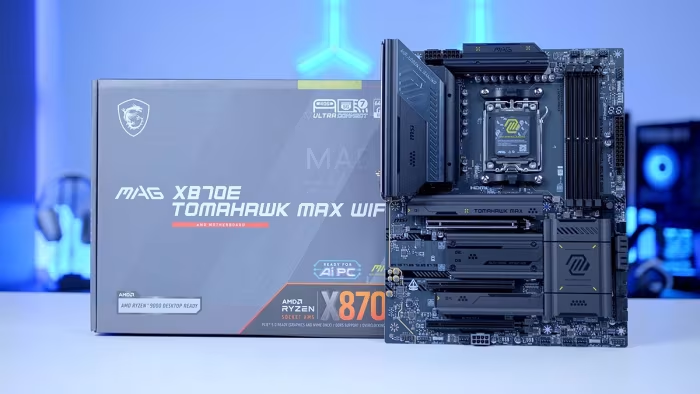
MSI MAG X870E Tomahawk Max WiFi
A versatile, high-end AM5 motherboard offering robust connectivity, USB 4 support, and refined features for modern enthusiast PC builds.
How This Score Is Calculated
- Sources analysed: 6 reviews
- Explicit scores: 0 sources (sentiment-based weighting)
- Sentiment-only: 6 sources
- Split: 5 Positive · 1 Mixed · 0 Negative
- Raw weighted average: 8.4
- Formula: Σ(score × weight) ÷ Σ(weight)
- Consensus bonus +0.3: 85% sources agreed
- Final score: 8.4/10 (clamped, rounded to 1 decimal)
Algorithmically calculated from source data. No manual adjustments.
- Most reviewed featureConnectivity (6/6)
- Most praisedUSB 4 & WiFi 7
- Most criticisedFront panel/USB headers
- Reviewer consensus levelHigh
The MSI MAG X870E Tomahawk Max WiFi is widely regarded as a reliable, high-performance motherboard that balances advanced features like USB 4 and WiFi 7 with a practical, enthusiast-focused design. While some reviewers find the aesthetic plain and note the absence of certain modern conveniences like universal tool-less installation, its robust I/O and solid power delivery make it a top-tier choice for AM5 systems. The Project Zero (PZ) variant receives specific praise for its innovative cable-free back-connect design, catering to users prioritizing a clean build.
🔧 Key Specifications
- Chipset: X870E
- RAM: DDR5 up to 8400MT/s
- Storage: 4x M.2 slots (Gen5 and Gen4)
- Connectivity: USB 4 (Dual Type-C), WiFi 7, 5-Gigabit LAN
- Power Delivery: 14+2+1 phases
- Audio: Limited 3.5mm jack selection
- Features: Tool-less M.2/PCI-E mechanisms, EZ front panel cable
💲 Price Range
$289.99 – $319.99 (approx. ₹24,000 – ₹26,700)
Prices sourced from reviews. Check current retailer pricing.
📊 What Reviewers Say — Feature by Feature
7 features evaluated across 6 sources.
👍 Key Strengths
- Excellent USB 4 and WiFi 7 connectivity
- Robust 14+2+1 power delivery phases
- Innovative tool-less M.2 and PCI-E mechanisms
- Project Zero cable-free build options
- Reliable AM5 platform performance
👎 Key Weaknesses
- Limited USB 2.0 and front headers
- Aesthetic considered plain by some
- Not entirely tool-less design
- Requires specific case for PZ model
💰 Value for Money Analysis
Reviewers generally view the board as a high-value proposition for mainstream to high-end builders. While priced at the upper-mid range ($289-$319), its feature set—specifically USB 4—is often reserved for significantly more expensive boards.
5 of 6 sources commented on price or value.
⚡ Where Reviewers Disagreed
The following areas saw meaningful disagreement across sources.
- Design Aesthetic: 2 sources praised the 'stealthy/minimalist' look, while 2 sources specifically criticised it as 'boring' or 'plain'. This suggests subjective preference plays a large role in the reception of the board's visual identity.
🎯 Who This Product Is For
Reviewer recommendations for different target audiences and use cases.
🛠️ Best Use Cases
- High-Performance Enthusiast BuildsExcellent for users needing high-speed storage (4 M.2 slots) and modern connectivity (USB 4/WiFi 7).Great
- Clean/Minimalist Cable ManagementThe Project Zero (PZ) model is specifically designed for builders prioritizing a cable-free interior.Great
- General Mainstream UpgradesReliable performance and BIOS make it a solid drop-in for AM5 users looking for longevity.Good
🔀 Alternatives Mentioned by Reviewers
- MSI MAG X870E Gaming Plus Max — A lower-tier alternative compared by reviewers; the Tomahawk Max offers superior rear I/O connectivity for a slightly higher price point. Choose this if you need to save money and don't require the advanced I/O array of the Tomahawk.
- Standard MSI MAG X870E TOMAHAWK WiFi — The non-PZ version of the main product; reviewers note that performance is identical, with the only major differentiator being the Back-Connect layout of the PZ model. Choose this if you are not using a compatible 'Project Zero' case.
Alternatives sourced exclusively from reviewer mentions.
🛒 Buyer's Guide
✅ Buy This If…
- You want future-proof connectivity like USB 4 and WiFi 7.
- You are building a clean PC and want to use the Project Zero cable-free design.
- You value reliable power delivery for high-end AM5 processors.
❌ Skip This If…
- You have many components requiring multiple internal USB 2.0 headers.
- You are not using a compatible case for the Project Zero reverse-connector model.
- You are looking for a highly flashy, RGB-heavy aesthetic.
⚠️ Things to Check Before Buying
- Verify your PC case supports the reverse-connector layout if purchasing the Project Zero (PZ) variant.
- Ensure your peripheral requirements do not exceed the available internal USB header count.
The MSI MAG X870E Tomahawk Max WiFi is an outstanding, reliable choice for modern AM5 enthusiasts, balancing high-end features like USB 4 and WiFi 7 with a practical building experience. While its design is understated and it lacks some internal header versatility, its overall build quality and innovative tool-less features make it a market leader. We recommend this board for most high-end builds, specifically the Project Zero variant for those pursuing a cable-free aesthetic.
Top Alternative: MSI MAG X870E Gaming Plus Max — A cost-effective alternative if your I/O needs are more modest.
PLG_CONTENT_IMAGEGALLERY_ERROR_NO_IMAGES
Reviewer Perspectives & Source Breakdown
MSI MAG X870E Tomahawk Max WiFi review: the same great motherboard, but ...
Price: Approximately ₹25,300
The MSI MAG X870E Tomahawk Max WiFi is an excellent mainstream motherboard that refines its predecessor with a more versatile aesthetic and future-proof design. It offers robust connectivity and reliable performance, making it a compelling choice for AM5 system builders.
Pros
- Great USB selection
- Solid build quality
- Intuitive BIOS
- Convenient feature set
- Universally appealing colour scheme
Cons
- Lacklustre one-click OC system
- No RGB frills
MSI MAG X870E TOMAHAWK MAX WiFi PZ Motherboard Review - GeekaWhat - geek...
The MSI MAG X870E TOMAHAWK MAX WiFi PZ is an impressive motherboard featuring a sleek, fully white aesthetic and a cable-free PROJECT ZERO design. It offers robust connectivity, including Gen5 support and WiFi 7, making it an excellent choice for clean, high-performance builds.
Pros
- Clean cable-free PROJECT ZERO reverse connector design
- Stunning full white aesthetic including slots and heatsinks
- Excellent connectivity with WiFi 7 and 5G LAN
- Includes helpful tool-less M.2 and PCI-E release mechanisms
- Support for high-speed DDR5 memory up to 8400MT/s
Cons
- Requires a compatible case for reverse connector design
- Installation process can be more challenging than standard boards
- Limited number of front USB 2.0 headers
- Top M.2 heatsink can be finicky to align
MSI MAG X870E TOMAHAWK MAX WiFi Motherboard Review - GeekaWhat - geekawh...
The MSI MAG X870E TOMAHAWK MAX WiFi is a feature-rich, high-end motherboard that offers excellent connectivity including USB 4 and WiFi 7. While its aesthetic is somewhat plain and audio options are limited, it provides a robust and reliable platform for modern enthusiast builds.
Pros
- Integrated WiFi 7 and 5-Gigabit LAN support
- Dual USB 4 Type-C ports
- Four M.2 storage slots (Gen5 and Gen4)
- Convenient tool-less M.2 heatsink design
- Includes useful accessories like the EZ front panel cable
Cons
- Limited 3.5mm audio jack selection
- Design aesthetic is plain and potentially boring
- Requires screwdriver for specific M.2 heatsink removal
- Limited front panel USB header selection
MSI Project Zero: MSI MAG X870E TOMAHAWK MAX WiFi PZ Motherboard Review ...
Price: Approximately ₹24,000 - ₹26,700 ($289.99 - $319.99)
The MSI MAG X870E TOMAHAWK MAX WiFi PZ is a top-tier, innovative motherboard that enables a nearly cable-free, clean PC build. It offers robust performance and excellent features while maintaining the reliability expected from the MAG series.
Pros
- Innovative Back-Connect design for cable-free builds
- Robust power delivery with 14+2+1 phases
- Includes helpful tool-less M.2 connections
- Stunning silver and white aesthetic
- High-end X870E chipset feature set
Cons
- Requires a specific compatible Project Zero case
- Limited aesthetic variety compared to other series
msi mag x870e tomahawk max wifi review the same great motherboard but be...
Carrying forward the plentiful USB ports and expansion slots of its predecessor, MSI's MAG X870E Tomahawk Max WiFi takes the stage with a refreshed feature set and aesthetics that everyone can appreciate.
Pros
Cons
msi mag x870e tomahawk max wifi motherboard review ProsCons...
The MSI MAG X870E TOMAHAWK MAX WiFi is a strong addition to the MSI motherboard line-up. An addition that treads the the line between performance and functionality to a tee. Whether it’s the bountiful rear IO options, support for cooling and fans, M.2 expansion, or the troubleshooting and diagnostic options that streamline PC building, the TOMAHAWK MAX WiFi strikes a near perfect balance and is a great all-round option to consider moving forward.There are some caveats ton consider, however, the lack of USB 2.0 headers and the fact that the board isn’t fully tool-less. While neither of these are particular dealbreakers, their admission does feel like a slight misstep on MSI’s part. Especially when considering, features such as fully tool-less design are rapidly becoming market norms.That being said, the MSI X870E TOMAHAWK MAX WiFi is another solid iteration of the TOMAHAWK design and is a worthy consideration for any PC Build in 2026!
Pros
- ✅ Bountiful rear IO
- ✅ Ample cooling support
- ✅ Diagnosis and troubleshooting tools
Cons
- ❌ Lack of USB 2.0 headers
- ❌ Not entirely tool-less
- ❌ Fairly boring design