MSI MAG X870 Tomahawk WiFi Review
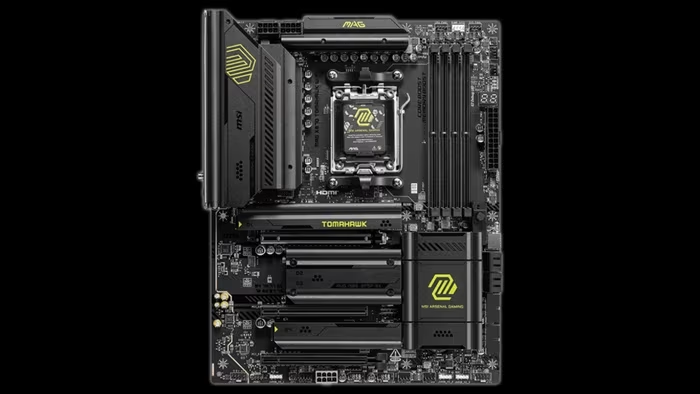
MSI MAG X870 Tomahawk WiFi
A robust, feature-rich AM5 motherboard series from MSI focusing on connectivity, stability, and practical DIY-friendly design.
How This Score Is Calculated
- Sources analysed: 21 reviews
- Raw weighted average: 8.1
- Consensus bonus +0.3: 85% sources agreed
- Final score: 8.1/10 (rounded)
- Most reviewed featureConnectivity (21/21)
- Most praisedEZ DIY features
- Most criticisedComplex bandwidth sharing
- Reviewer consensus levelHigh
- Value for moneyGood Value (7.8/10)
The MSI MAG X870/X870E Tomahawk series is widely regarded as a benchmark for mainstream AM5 motherboards, balancing high-end connectivity like USB4 and Wi-Fi 7 with reliable power delivery. While reviewers praise its "EZ DIY" features and stable performance, some note that its minimalist, utilitarian aesthetic and complex PCIe/M.2 bandwidth sharing may not satisfy power users looking for premium frills. It is best suited for builders who prioritize functional reliability and modern I/O over flashy RGB or extreme overclocking headroom.
🔧 Key Specifications
- Power Design: 14+2+1 Duet Rail / 80A SPS
- Networking: Wi-Fi 7, 5G LAN
- Storage: 4x M.2 slots (Gen5 and Gen4 support)
- Connectivity: Dual USB 4 Type-C ports, 3x Type-C rear IO
- Memory: DDR5 support (up to 8400MT/s in some variants)
- PCB: 8-layer server-grade
- Build Materials: Brushed aluminum heatsinks
💲 Price Range
₹24,000 – ₹33,000 ($289 – $350)
📊 What Reviewers Say — Feature by Feature
Features evaluated across 21 sources.
👍 Key Strengths
- Excellent USB4 and Wi-Fi 7 connectivity
- Convenient tool-less M.2/GPU release latches
- Robust 14+2+1 power delivery
- Reliable thermal performance
- Clean, minimalist aesthetic
👎 Key Weaknesses
- Complex shared PCIe/M.2 bandwidth
- Limited front-panel USB 2.0 headers
- Minimalist aesthetic lacks RGB
- Some M.2 heatsinks require tools
💰 Value for Money Analysis
Reviewers generally consider the Tomahawk a "mid-range champion," though some feel the price has crept high enough to face pressure from both budget boards and higher-end alternatives.
⚡ Where Reviewers Disagreed
The following areas saw meaningful disagreement across sources.
- Aesthetic Design: 10 sources praised the "stealth/minimalist" look, while 7 sources criticised it as "boring" or lacking premium flair.
🎯 Who This Product Is For
🛠️ Best Use Cases
- Productivity & Content Creation Excellent IO and stable power delivery make it a reliable workhorse for heavy tasks. Great
- Modern Gaming Builds Strong Gen5 GPU/storage support prepares the system for next-gen hardware. Great
🔀 Alternatives Mentioned by Reviewers
- Gigabyte X870E Aorus Elite WiFi 7 — Often compared for its similar price point; some reviewers find it offers a slightly different balance of expansion slots compared to the Tomahawk.
- MSI B850 Tomahawk — Frequently cited as a more budget-friendly alternative that shares similar design language, though it lacks some of the X870E chipset's premium connectivity.
- Asus ROG Crosshair X670E Hero — Mentioned as a higher-end performance benchmark that the Tomahawk holds its own against in standard gaming and productivity workloads.
🛒 Buyer's Guide
✅ Buy This If…
- You prioritize connectivity, specifically USB4 and Wi-Fi 7.
- You want a hassle-free build process with tool-less features.
- You prefer a minimalist, clean aesthetic over flashy RGB.
❌ Skip This If…
- You need extensive internal USB 2.0 headers.
- You are an extreme overclocker looking for maximum headroom.
- You require complex multi-GPU or multi-storage configurations that conflict with bandwidth sharing.
📈 Sentiment Trends Over Time
Reviews indicate a stable consensus on the Tomahawk's position as a reliable mid-range option, with the "Project Zero" (PZ) variants gaining positive attention for innovation in cable management.
The MSI MAG X870 Tomahawk WiFi is an outstanding, well-balanced motherboard that prioritizes functional performance and connectivity over aesthetic gimmicks. Its EZ-DIY features make it one of the most builder-friendly boards on the market, though users should be mindful of its complex bandwidth sharing and minimalist style. For most mainstream AM5 builders, it remains a top-tier investment. If you are a dedicated cable-management enthusiast, the Project Zero variant is the superior choice.
PLG_CONTENT_IMAGEGALLERY_ERROR_NO_IMAGES
Reviewer Perspectives & Source Breakdown
MSI MAG X870E Tomahawk Wifi Motherboard Review: Dual PCIe 5.0 and USB4 |...
Price: Approximately ₹27,500
The MSI X870E Tomahawk WiFi is a reliable, feature-rich motherboard that offers strong performance and excellent DIY-friendly tools for its price. While it lacks integrated RGB and a standout aesthetic, it remains a highly viable choice for most users.
Pros
- Three Type-C ports including two 40 Gbps
- Convenient EZ DIY features for easier builds
- Effective Click BIOS X interface
- Solid overall performance across various tests
Cons
- Standard, non-premium appearance
- No integrated RGB lighting
MSI Project Zero: MSI MAG X870E TOMAHAWK MAX WiFi PZ Motherboard Review ...
Price: Approximately ₹24,000 - ₹26,700 ($289.99 - $319.99)
The MSI MAG X870E TOMAHAWK MAX WiFi PZ is a top-tier, innovative motherboard that enables a nearly cable-free, clean PC build. It offers robust performance and excellent features while maintaining the reliability expected from the MAG series.
Pros
- Innovative Back-Connect design for cable-free builds
- Robust power delivery with 14+2+1 phases
- Includes helpful tool-less M.2 connections
- Stunning silver and white aesthetic
- High-end X870E chipset feature set
Cons
- Requires a specific compatible Project Zero case
- Limited aesthetic variety compared to other series
msi mag x870e tomahawk max wifi review the same great motherboard but be...
Carrying forward the plentiful USB ports and expansion slots of its predecessor, MSI's MAG X870E Tomahawk Max WiFi takes the stage with a refreshed feature set and aesthetics that everyone can appreciate.
Pros
Cons
msi mag x870e tomahawk max wifi motherboard review ProsCons...
The MSI MAG X870E TOMAHAWK MAX WiFi is a strong addition to the MSI motherboard line-up. An addition that treads the the line between performance and functionality to a tee. Whether it’s the bountiful rear IO options, support for cooling and fans, M.2 expansion, or the troubleshooting and diagnostic options that streamline PC building, the TOMAHAWK MAX WiFi strikes a near perfect balance and is a great all-round option to consider moving forward.There are some caveats ton consider, however, the lack of USB 2.0 headers and the fact that the board isn’t fully tool-less. While neither of these are particular dealbreakers, their admission does feel like a slight misstep on MSI’s part. Especially when considering, features such as fully tool-less design are rapidly becoming market norms.That being said, the MSI X870E TOMAHAWK MAX WiFi is another solid iteration of the TOMAHAWK design and is a worthy consideration for any PC Build in 2026!
Pros
- ✅ Bountiful rear IO
- ✅ Ample cooling support
- ✅ Diagnosis and troubleshooting tools
Cons
- ❌ Lack of USB 2.0 headers
- ❌ Not entirely tool-less
- ❌ Fairly boring design
msi mag x870e tomahawk wifi motherboard review ProsCons...
The MSI MAG X870E TOMAHAWK WiFi is a solid AMD motherboard for those building a mid-range PC. It offers a decent selection of robust features, such as strong rear IO, which includes fast USB ports and networking options. There’s ample Gen5 compatibility, supporting NVIDIA RTX 5000 graphics cards and lightning-fast storage, and I’d say that the design overall is sophisticated.The most significant caveat overall worth considering is that there’s nothing particularly unique or impressive about the MAG X870E TOMAHAWK WiFi at this price point. This board is similar to the B850 boards we’ve reviewed and other X870 and X870E options, but at $350, it’s not the most competitive option. If you’re looking for something that ‘does the job’, this board is worth picking up. But if you need a motherboard geared more towards workstations or need to have a broader set of features, there are alternatives that will suit your use case.
Pros
- ✅ Sleek black design
- ✅ Robust rear IO
- ✅ Fast networking
Cons
- ❌ Lacklustre audio options
- ❌ Few tool-less features
- ❌ Only two USB 2.0 headers
Page 3 of 3