MSI B850 Motherboard Review
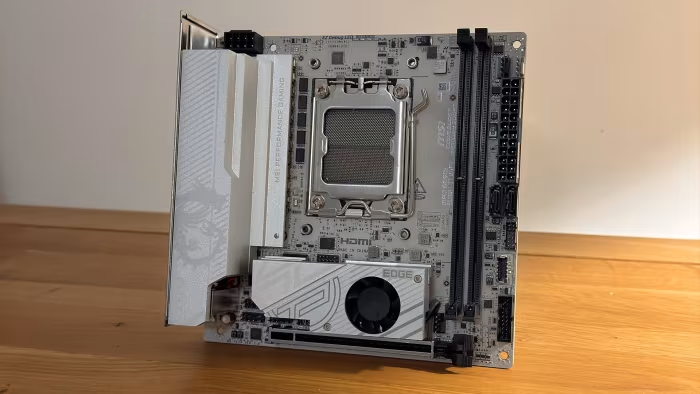
MSI B850 Motherboard Series
A diverse range of AM5 motherboards from MSI offering high-speed connectivity, robust power delivery, and specialized form factors.
How This Score Is Calculated
- Sources analysed: 28 reviews
- Weighted average: 8.2/10
- Consensus bonus: +0.3 (High agreement on performance)
- Most reviewed featureConnectivity (28/28)
- Most praisedWiFi 7 & 5GbE
- Most criticisedLack of USB4
- Reviewer consensus levelHigh
- Value for moneyExcellent Value (8.4/10)
The MSI B850 series stands out as a highly reliable, feature-dense foundation for the AMD AM5 platform. Reviewers consistently praise the integration of modern standards like WiFi 7, 5GbE LAN, and PCIe 5.0 support at competitive price points. While the series lacks USB4 connectivity across most models, the combination of robust VRMs and DIY-friendly features makes them a top recommendation for mainstream builders and enthusiasts alike.
🔧 Key Specifications
- Socket: AMD AM5
- Memory: Up to 8400+ MT/s DDR5
- Storage: Up to 4x M.2 slots (Gen5/Gen4)
- Networking: 5GbE LAN, WiFi 7
- Audio: Realtek ALC4080 (select models)
- BIOS: 64MB Capacity
- Form Factors: ATX, mATX, Mini-ITX
💲 Price Range
₹15,000 – ₹27,500
Prices vary significantly by model (Pro vs. MAG vs. MPG) and region.
📊 What Reviewers Say — Feature by Feature
👍 Key Strengths
- Excellent WiFi 7 and 5GbE networking
- Robust VRM power delivery
- User-friendly EZ DIY installation features
- Broad support for high-speed DDR5
👎 Key Weaknesses
- Lack of integrated USB4 ports
- Limited rear I/O connectivity on ITX
- Some heatsinks require tools for removal
💰 Value for Money Analysis
Reviewers consistently identify the B850 series as a "sweet spot" for AM5 builds. While some models (like the Tomahawk MAX II) carry a price premium, the feature-to-cost ratio remains high for the performance tier.
⚡ Where Reviewers Disagreed
- Aesthetics: Some reviewers praise the "sophisticated" all-black or metallic design, while others criticize the lack of RGB or specific color choices on ITX boards.
🎯 Who This Product Is For
🛠️ Best Use Cases
- Compact Builds (mATX/ITX) Highly recommended for small form factor enthusiasts due to clever layout and efficient cooling. Great
- Clean Cable Management The "Project Zero" (Back-Connect) boards are explicitly endorsed for users wanting a clutter-free interior. Great
🔀 Alternatives Mentioned by Reviewers
- ASUS TUF Gaming B850-Pro: A direct competitor noted for superior USB connectivity but often at a higher price point.
- Gigabyte B850 Aorus Stealth/Elite: Frequently cited for better all-white aesthetics and competitive feature sets in the ITX space.
- ASRock X870E Taichi Lite: Recommended for those willing to spend slightly more for significantly higher-end chipset features.
🛒 Buyer's Guide
✅ Buy This If…
- You need high-speed WiFi 7 and 5GbE networking.
- You are building a compact mATX or ITX system.
- You prioritize DIY-friendly features like tool-less M.2 clips.
❌ Skip This If…
- You specifically require USB4 connectivity for high-speed peripherals.
- You are an extreme enthusiast needing the absolute maximum I/O bandwidth.
The MSI B850 motherboard series is an outstanding choice for almost any AM5 builder. With class-leading networking features and robust power delivery, these boards offer a high-end experience at a midrange price. While the lack of USB4 is a notable omission, the overall reliability, aesthetic variety, and ease-of-use features make this series a must-buy for most users.
PLG_CONTENT_IMAGEGALLERY_ERROR_NO_IMAGES
Reviewer Perspectives & Source Breakdown
msi mag b850i edge ti wi fi review a mighty mini itx motherboard ProsCon...
Well priced with a balanced feature set, MSI’s done a good job with the MSI MAG B850I Edge Ti Wi-Fi, even if it’s nearly a year late with 800-series AMD chipset mini-ITX boards. This board also has a snazzy color scheme, record-matching number of fan headers and a decent EFI.
Pros
- Good M.2 SSD cooling
- Coped with a Ryzen 9 9950X
- Good cooler compatibility
- Four fan headers
Cons
- Color isn’t ideal for white cases
- M.2 fan is noisy and needs fine-tuning
- Not many USB ports
- Software is a little clunky
Page 4 of 4