Malwarebytes Free Review
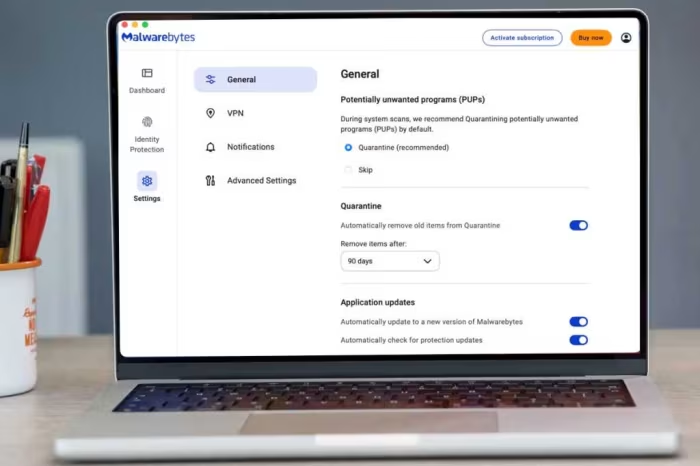
Malwarebytes Free
An on-demand malware removal utility designed to clean infected systems, developed by Malwarebytes.
How This Score Is Calculated
- Sources analysed: 5 reviews
- Explicit scores: 0 sources
- Sentiment-only: 5 sources (weighted 1.0×)
- Split: 2 Positive · 1 Mixed · 2 Negative
- Raw weighted average: 5.8
- Formula: Σ(score × weight) ÷ Σ(weight)
- Final score: 5.8/10
- Most reviewed featureMalware detection (5/5)
- Most praisedOn-demand cleaning
- Most criticisedLack of real-time protection
- Reviewer consensus levelModerate
Malwarebytes Free is widely regarded as a specialized tool for deep-cleaning systems following a malware breach rather than a comprehensive security suite. While reviewers praise its ability to eradicate persistent threats that other software misses, they consistently warn that its lack of real-time protection makes it unsuitable as a standalone antivirus solution. Users should expect a fast, effective cleanup utility that functions best as an on-demand secondary scanner.
🔧 Key Specifications
Specifications sourced from reviewer mentions.
- Primary Function: On-demand malware scanner
- Real-time Protection: No
- Browser Protection: Includes Browser Guard for fraudulent/dangerous pages
- Additional Features: Digital footprint scan, collection of system tools
💲 Price Range
Free (with optional paid subscription model)
Prices sourced from reviews. Check current retailer pricing.
📊 What Reviewers Say — Feature by Feature
5 features evaluated across 5 sources.
👍 Key Strengths
- Effective deep malware removal
- Fast scanning speed
- Integrated Browser Guard
- Useful digital footprint scanning
👎 Key Weaknesses
- No real-time protection
- Mac platform bugs and crashes
- Incomplete detection of active threats
- Missing external volume scanning
🎯 Who This Product Is For
Reviewer recommendations for different target audiences and use cases.
🔀 Alternatives Mentioned by Reviewers
- Avast One / Avast One Essential — A comprehensive, standalone antivirus solution that provides the real-time protection and active monitoring that Malwarebytes Free lacks. Reviewers recommend this as a primary security tool.
- Bitdefender — A full-featured security suite compared against Malwarebytes to highlight the latter's limitation as a secondary-only tool. It is recommended for users needing complete, all-in-one protection.
- AVG AntiVirus Free — An alternative standalone antivirus program that provides active, continuous protection. It is cited as a better choice for users seeking a primary, comprehensive security solution.
Alternatives sourced exclusively from reviewer mentions.
🛒 Buyer's Guide
✅ Buy This If…
- You need a specialized, on-demand tool to perform deep-cleaning on an already infected computer.
- You are already using a primary, full-featured antivirus and want an extra layer of detection.
❌ Skip This If…
- You are looking for a primary antivirus solution to provide real-time, background protection.
- You are a Mac user seeking a stable, feature-rich experience, as the current macOS port is prone to technical issues.
Malwarebytes Free is a highly capable, specialized tool for deep-cleaning systems after an infection, but it is strictly a secondary utility. While it excels at catching threats that other programs miss, its lack of real-time protection and the significant stability issues on the Mac platform prevent it from being a standalone security solution. Most users should pair this with a full-featured antivirus to achieve comprehensive protection. If you require an all-in-one security suite, consider alternatives like Avast One or Bitdefender instead.
PLG_CONTENT_IMAGEGALLERY_ERROR_NO_IMAGES
Reviewer Perspectives & Source Breakdown
Malwarebytes Free - Review 2025 - PCMag Middle East - me.pcmag.com...
Malwarebytes Free is a reliable tool for cleaning up persistent malware infections after an attack, but it lacks real-time protection. It should be used as a secondary, on-demand scanner alongside a full-featured antivirus.
Pros
- Fast scan speed
- Detects most malware infestations
- Browser Guard blocks fraudulent and dangerous pages
- Includes digital footprint scan for exposed data
- Offers a new collection of system tools
Cons
- No real-time malware protection
- Missed some active malware infestations in testing
- Left behind traces of detected malware after scans
Malwarebytes Free Review: A Free Removal Tool for Most Malware | PCMag -...
Price: Free
Malwarebytes Free is a reliable tool for deep-cleaning systems after a malware infection, but it lacks real-time protection. It should be used as a secondary scanner alongside a primary antivirus program.
Pros
- Fast scanning capabilities
- Detects most malware infestations
- Browser Guard blocks fraudulent and dangerous pages
- Includes digital footprint scan for exposed data
- Offers a new collection of system tools
Cons
- No real-time malware protection
- Missed some active malware infestations in testing
- Left behind traces of detected malware
Malwarebytes Free - Review 2025 - PCMag UK - uk.pcmag.com...
Malwarebytes Free is a reliable tool for cleaning up persistent malware infections, but it lacks real-time protection. It serves best as a secondary, on-demand scanner alongside a full-featured antivirus.
Pros
- Fast scanning capabilities
- Detects most malware infestations
- Browser Guard blocks fraudulent sites
- Digital footprint scan for exposed data
- Useful collection of system tools
Cons
- No real-time malware protection
- Missed some active malware in testing
- Left behind traces of detected malware
Malwarebytes Free Antivirus Review | Macworld - macworld.com...
Price: Approximately ₹3,750 per year (for paid version)
Malwarebytes Free is effective at removing persistent malware, but it is hampered by frequent bugs, crashes, and aggressive paywalls that limit its usability. It feels less developed than the Windows version, particularly due to the ongoing lack of external volume scanning.
Pros
- Good settings and performance
- Easily created file whitelists
- Easy installation
- Removes malware other applications miss
Cons
- Occasional software crashes
- Requires reinstallation after crashes
- No external volume scan feature
- Most features locked behind subscriptions
malwarebytes free antivirus review ProsCons...
Malwarebytes’ free edition is good at hunting down and removing some of the peskiest viruses and malware around, but between its bugs, occasional crashes, need for reinstallation, and the fact that its full feature set is locked out until an account has been created or a subscription has been signed up for, this feels like pulling teeth. Couple this in with the fact that an external drive scanning feature is STILL missing after all these years and it feels as if the Mac is a second-class citizen where the company is concerned.
Pros
- Good settings, performance, and easily-created whitelists
- Easy installation, full disk access setup
- Effectively catches and removes some viruses and malware that similar applications sometimes miss
Cons
- Occasional crashes that required software uninstallation, Mac reboot, and reinstallation of Malwarebytes
- Still no external volume scan feature present after all these years