Mac Studio Review
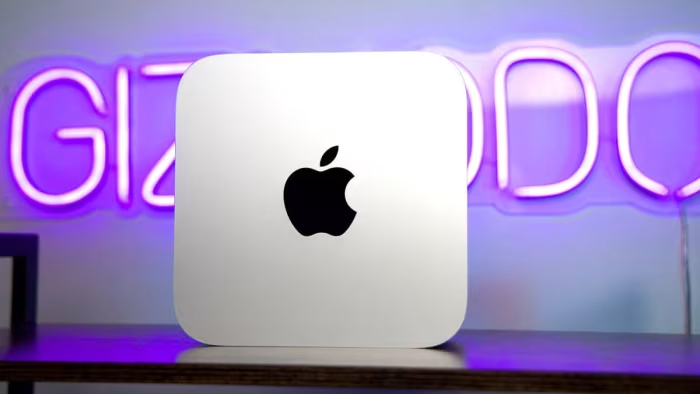
Apple Mac Studio (2025)
A compact, high-performance desktop computer designed by Apple for professional creative and technical workflows.
How This Score Is Calculated
- Sources analysed: 7 reviews
- Explicit scores: 0 sources (weighted 1.5×)
- Sentiment-only: 7 sources (weighted 1.0×)
- Split: 6 Positive · 1 Mixed · 0 Negative
- Raw weighted average: 8.7
- Formula: Σ(score × weight) ÷ Σ(weight)
- Final score: 8.7/10 (clamped, rounded to 1 decimal)
Algorithmically calculated from source data. No manual adjustments.
- Most reviewed featurePerformance (7/7)
- Most praisedCompact size
- Most criticisedNon-upgradability
- Reviewer consensus levelHigh
The Mac Studio occupies a unique space in the current desktop landscape, bridging the gap between the compact, consumer-focused Mac mini and the extreme, modular Mac Pro. It is engineered to provide workstation-level compute power in a footprint that minimizes desk clutter, addressing a growing demand for high-performance desktop solutions that do not require massive tower enclosures.
Within the professional ecosystem, the Mac Studio is positioned as the primary choice for users whose workflows demand sustained, intensive processing—such as AI development, 8K video editing, and complex 3D rendering—without the overhead and expense of the full-tower Mac Pro.
🔧 Key Specifications
Specifications sourced from reviewer mentions. Verify with manufacturer for complete details.
- Processor: M4 Max / M3 Ultra
- RAM: Up to 512GB (unified)
- Storage: Fixed internal SSD
- Connectivity: Thunderbolt 5 (4 ports), USB-A (2 ports), Wi-Fi 6E
- Cooling: Silent, high-efficiency thermal design
- Build: Compact, iconic aluminum enclosure
📊 What Reviewers Say — Feature by Feature
6 features evaluated across 7 sources.
👍 Key Strengths
- Exceptional processing speed
- Compact, space-saving design
- Whisper-quiet thermal management
- Robust Thunderbolt 5 connectivity
👎 Key Weaknesses
- Non-upgradable RAM and SSD
- High price point
- Disappointing gaming performance
- Niche appeal for casual users
🎯 Who This Product Is For
Reviewer recommendations for different target audiences.
🔀 Alternatives Mentioned by Reviewers
- Mac mini (M4 Pro) — Recommended as a more budget-friendly alternative for users who do not require the extreme performance tier of the Mac Studio.Recommended by Source 5 and 21 for users needing a smaller footprint and lower cost.
- Mac Pro — The full-tower alternative for users who require internal expansion and modularity.Mentioned by Source 5 as the only alternative for those requiring modular upgrades.
- Custom-built Windows Workstations — Often cited as an alternative for users seeking modularity and lower price-to-performance ratios, though at the cost of the Mac Studio's superior acoustics.Mentioned by Source 5 and 19 as the primary alternative for hardware enthusiasts.
Alternatives sourced exclusively from reviewer mentions.
✅ Buy This If…
- You are a professional creator who requires high-performance, sustained compute power.
- You work in environments where desk space is limited and silent operation is critical.
- You rely on the macOS ecosystem for your professional workflow.
❌ Skip This If…
- You are a casual user or student who does not require professional-grade workstation power.
- You require a machine that allows for internal component upgrades over time.
- You are primarily looking for a gaming-first desktop.
The Mac Studio is an elite workstation that successfully delivers extreme performance in a remarkably compact and quiet package. While its lack of internal modularity and high price tag may be prohibitive for some, it remains the gold standard for professionals needing a reliable, high-speed machine for creative production. We recommend it for power users and creative pros, while casual users should look toward the Mac mini. If upgradeability is your priority, consider a custom-built workstation instead.
PLG_CONTENT_IMAGEGALLERY_ERROR_NO_IMAGES
Reviewer Perspectives & Source Breakdown
Apple Mac Studio (2026, M5 Ultra) Review: Quad-Die Processing Power to D...
Price: Approx. ₹4,65,000 to ₹15,40,000
The 2026 Mac Studio is a formidable workstation that leverages the quad-die M5 Ultra chip to deliver exceptional performance for AI tasks and content creation. While its performance and memory bandwidth are industry-leading, the high cost and lack of ISV certification make it a specialized investment for serious professionals.
Pros
- Dominant single- and multi-core processor performance
- Massive memory options and high bandwidth for AI
- Cutting-edge connectivity including Thunderbolt 5 and Wi-Fi 7
- Compact and familiar desktop footprint
- Fast, private, and on-device Apple Intelligence tools
Cons
- Upgrade options lead to extremely high pricing
- Graphics performance trails flagship discrete Nvidia GPUs
- No ISV certification for engineering or medical apps
- Internals are locked and not user-upgradable
M5 Max Mac Studio review: The SSD leap makes this the Mac desktop to buy...
Price: Starting at approx. ₹2,10,000
The M5 Max Mac Studio is an expensive but powerful machine, with significant SSD speed improvements that justify an upgrade even for recent users. It is highly recommended for professionals who prioritize storage throughput, extensive display setups, and local AI processing.
Pros
- Dramatic improvement in SSD speeds
- Solid multi-core CPU and GPU performance gains
- Expanded support for up to five external displays
- Strong performance in local AI workloads
Cons
- Components are not user-replaceable or upgradeable
- Base price has increased by $500
- High cost for memory and chip upgrades
AudioThing Orbita Review: Euclidean Drum Machine, Workflow & Price | ARE...
AudioThing Orbita is a specialized tool that excels at quickly generating evolving, interlocking rhythmic patterns rather than replacing traditional drum samplers. It is highly effective for adding movement to secondary percussion layers while keeping the main groove anchored.
Pros
- Efficient workflow for creating evolving rhythms
- Fast exploration of rhythmic relationships
- Combines sequencing, playback, and sound shaping
- Great for techno, IDM, and experimental genres
Cons
- Not ideal for conventional 4/4 drum programming
- Lacks advanced deep drum synthesis capabilities
- Can become cluttered if too many tracks move
Vienna Ensemble Pro 8.1 Review: Kontakt Hosting, Mac Studio Performance ...
Vienna Ensemble Pro 8.1 remains an essential infrastructure tool for large-scale professional scoring and orchestral production. It solves critical workflow bottlenecks by separating instrument hosting from the DAW, ensuring stability and persistence for massive templates.
Pros
- Efficiently manages massive Kontakt-based orchestral templates
- Provides persistent instrument hosting independent of DAW sessions
- Reduces project loading and initialization times significantly
- Enables stable cross-platform and multi-computer integration
Cons
- Unnecessary for most typical recording and mixing sessions
- High learning curve for complex routing configurations
- Provides no direct improvement to audio sound quality
Softube Flow Studio Review: Can Macro Mixing Really Speed Up Your Workfl...
Price: Approximately ₹35,000
Softube Flow Studio is a revolutionary mixing tool that shifts focus from granular parameter tweaking to macro-controlled signal chains. It fosters a faster, more creative workflow that emphasizes sound design and directional decision-making over traditional mixing precision.
Pros
- Promotes faster, more decisive mixing workflows
- High-quality hardware construction
- Highly inspiring for sound design and synth processing
- Supports custom signal chain creation
Cons
- Unfamiliar workflow for traditional mix engineers
- Requires inserting a specific plugin on channels
- Subscription model required for full library access
MAC Studio Fix fluid foundation review - Mamabella | Everyday Beautiful ...
Price: Approximately ₹3,700
A reliable, long-lasting foundation that offers impressive coverage and a massive shade range, making it a cult favorite despite its thick, drying formula. It performs extremely well and outperforms many pricier competitors, justifying its luxury price point.
Pros
- Huge shade range available
- Provides long-lasting wear
- Offers excellent, buildable coverage
Cons
- Formula can be quite drying
- Thick consistency not ideal for mature skin
- Pump must be purchased separately
Apple Studio Display XDR Review: uncompromised quality for the Mac loyal...
Price: Approximately 3,15,000 - 3,42,000 INR
The Studio Display XDR is a premium, impeccably built monitor featuring a high-quality mini LED panel and excellent factory calibration. While it offers deep integration with the Apple ecosystem, its high price and limited physical adjustments may be restrictive for some professional users.
Pros
- Impeccable build quality and finishing
- High-quality mini LED backlighting
- Excellent factory color calibration
- Integrated six-speaker audio system
- Effective anti-reflective nano-texture coating
Cons
- Very high price point
- Limited stand adjustability
- Non-removable power cable
- Limited port selection
- Calibration presets require macOS
Apple Mac Studio With M4 Max Review: Big Gains, Petite Package | HotHard...
Price: Approximately ₹1,68,000
The 2025 Mac Studio with the M4 Max chip is a powerful and efficient desktop that serves as a worthy upgrade for those needing high-end performance. While it lacks significant physical design changes, its improved internals and robust connectivity make it a compelling choice for demanding professional workflows.
Pros
- Extremely strong M4 Max CPU performance
- Four standard Thunderbolt 5 ports
- Efficient and silent cooling system
- Compact and power-efficient form factor
Cons
- Very few native triple-A games available
- Only two USB-A ports provided
- Supports Wi-Fi 6E but lacks Wi-Fi 7
- High cost for internal storage upgrades
Review: Framework Desktop is a mash-up of a regular desktop PC and the M...
The Framework Desktop is a curious product that offers solid design and modularity, yet struggles to justify itself against standard self-built PCs. While it is better than no-name mini desktops, it prioritizes a small form factor over the superior upgradeability and performance of custom-built machines.
Pros
- Compact and space-saving design
- Easy and well-documented assembly process
- Includes helpful screwdriver and clear instructions
- Uses standard industry parts for cooling
- Magnetic panels allow for easy customization
Cons
- Less upgradeable than standard custom-built PCs
- Lower performance compared to traditional desktop builds
- Price premium for limited expansion capabilities
- Front USB ports have speed limitations
- Display outputs not supported on front expansion cards
Page 2 of 5