









































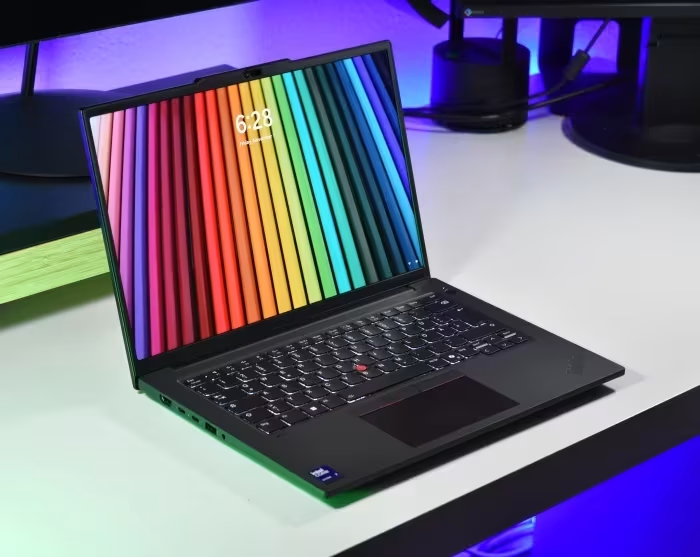
Lenovo ThinkPad P14s Review
Consensus Review14 independent sources
Lenovo ThinkPad P14s
A professional-grade 14-inch mobile workstation series by Lenovo, balancing portable business laptop convenience with ISV-certified hardware.
7.2/10
GENERALLY RECOMMENDED
✅ 64% Positive (9 sources)⚠️ 28% Mixed (4 sources)❌ 8% Negative (1 source)
How This Score Is Calculated
- Sources analysed: 14 reviews
- Explicit scores: 9 sources (weighted 1.5×)
- Sentiment-only: 5 sources (weighted 1.0×)
- Split: 9 Positive · 4 Mixed · 1 Negative
- Raw weighted average: 7.2
- Formula: Σ(score × weight) ÷ Σ(weight)
- Review period: Gen 1 through Gen 6
- Final score: 7.2/10 (clamped, rounded to 1 decimal)
Algorithmically calculated from source data. No manual adjustments.
- Most reviewed featureBuild Quality (11/14)
- Most praisedKeyboard
- Most criticisedBattery Life
- Reviewer consensus levelModerate
- Value for moneyGood Value (7.1/10)
The Lenovo ThinkPad P14s is a versatile, professional-grade mobile workstation that bridges the gap between standard business ultrabooks and heavy-duty desktop replacements. While praised for its industry-leading keyboard, robust build quality, and essential connectivity—including physical RJ45 ports—it often struggles with thermal management and inconsistent battery life depending on the display panel chosen. It serves best as a highly portable ISV-certified machine for CAD and BIM professionals, though some generations struggle to justify their premium over standard ThinkPad T-series models.
🔧 Key Specifications
Specifications sourced from reviewer mentions. Verify with manufacturer for complete details.
- Processor: Intel Core Ultra / AMD Ryzen PRO / Intel Tiger Lake (varies by Gen)
- RAM: Up to 96GB (Dual SO-DIMM in later Gens)
- Display: 14-inch to 14.5-inch (IPS/OLED options, up to 3K 120Hz)
- Battery: Varies; often criticized for OLED power drain
- Charging: USB-C PD
- Main Camera: Average quality across generations
- OS: Windows 10/11 Pro
- 5G: Optional (varies by generation)
- Wi-Fi: Wi-Fi 6E/6
- NFC: Included on many models
- USB: Thunderbolt 4 / USB4 / USB-A
- IP Rating: Military-grade durability/spill-resistant
- Build Materials: Aluminum/Plastic composite
💲 Price Range
₹1,03,600 to ₹2,40,000
Prices sourced from reviews. Check current retailer pricing.
📊 What Reviewers Say — Feature by Feature
14 features evaluated across 14 sources.
KeyboardConsistently rated as industry-leading, providing a comfortable, spill-resistant typing experience.
10 / 14Build QualityReviewers frequently highlight the robust, durable, and professional-grade chassis construction.
11 / 14Battery LifePerformance is polarizing, ranging from excellent in some AMD models to poor on high-resolution OLED configurations.
8 / 14ConnectivityCommended for maintaining legacy ports, including the physical RJ45 Ethernet port, even as other ultrabooks drop them.
9 / 14👍 Key Strengths
- Industry-leading keyboard and input devices
- Robust, professional-grade build quality
- Excellent port selection including RJ45
- ISV-certified performance for CAD/BIM
- Highly portable 14-inch form factor
👎 Key Weaknesses
- Battery life varies significantly (OLED drain)
- Occasional thermal throttling under load
- Entry-level displays lack color accuracy
- No SD card slot on many models
- Heavier than competing ultrabooks
💰 Value for Money Analysis
7.1/10Good Value
Reviewers generally view the P14s as a solid investment for professional use, though they note it often competes with the standard T14 series, which can offer similar performance for a lower price. Prices span a wide bracket, with newer 'Gen' models commanding a significant premium over older or base-spec variants.
11 of 14 sources commented on price or value.
⚡ Where Reviewers Disagreed
The following areas saw meaningful disagreement across sources.
- Workstation Credibility: 5 sources praise the ISV-certified performance, while 2 sources argue it is a 'workstation in name only' due to integrated GPU limitations. Disagreement stems from whether the user requires heavy rendering power or just ISV certification for CAD stability.
🎯 Who This Product Is For
Reviewer recommendations for different target audiences and use cases.
Corporate ProfessionalsThe reliable build, excellent keyboard, and port selection make it a standard choice for business productivity.
5 / 14CAD/BIM EngineersThe ISV-certified hardware ensures stability for specific engineering software workflows.
4 / 14Heavy Content CreatorsThose needing high-end GPU rendering power should look elsewhere, as the P14s can struggle with sustained heavy loads.
3 / 14🛠️ Best Use Cases
- Mobile EngineeringGreat for field work due to portability and ISV certifications.Great
- Office ProductivityKeyboard and port selection excel for daily document and spreadsheet tasks.Great
- 3D RenderingPerformance is often too limited by integrated graphics or thermal throttling.Poor
🔀 Alternatives Mentioned by Reviewers
Maximise this list. Include EVERY single competitor, rival, or alternative product mentioned in any of the source reviews. Do not omit any. More alternatives and longer lists are better.
- Lenovo ThinkPad T14 / T14s — Often cited as the cheaper, standard-issue alternative that offers similar performance without the 'workstation' premium. Choose this if you don't need ISV certification.
- HP ZBook Firefly 14 (G7-G11) — The most direct competitor in the portable workstation space. Reviewers often compare build quality and thermal management directly between these two.
- Dell Precision 5490 — A premium alternative often cited for its high-end build and performance, though it typically carries a higher price tag.
- HP ZBook Ultra G1a 14 — Mentioned as a 'true' 14-inch workstation that provides more power than the P14s for users requiring heavy compute.
- Lenovo ThinkPad X9 14 Aura Edition — Recommended as a better choice if you want a premium, modern ultraportable experience over a workstation chassis.
Alternatives sourced exclusively from reviewer mentions.
🛒 Buyer's Guide
✅ Buy This If…
- You need an ISV-certified machine for professional engineering software.
- You value physical connectivity like RJ45 Ethernet in a portable chassis.
- You want the legendary ThinkPad typing experience for heavy document work.
❌ Skip This If…
- You do heavy GPU rendering (look for P16 models instead).
- You are a general user who can save money with the standard T14 model.
- You need long battery life with a high-resolution OLED screen.
⚠️ Things to Check Before Buying
- Check the display panel specs; base panels are often average, while OLEDs drain battery.
- Verify if the specific generation supports user-replaceable RAM, as some models have soldered memory.
- Confirm if your specific CAD application requires the ISV certification provided by the Quadro/RTX GPU.
📈 Sentiment Trends Over Time
Reviews span Gen 1 through Gen 6. The following changes were detected:
- Performance — Newer generations (Gen 6 with Arrow Lake) have shown significant improvements in thermal efficiency and compute power.
- Portability — Newer chassis designs have become slightly heavier and thicker than initial marketing specs suggested.
GENERALLY RECOMMENDED
The Lenovo ThinkPad P14s remains a reliable, if occasionally unexciting, workhorse that succeeds in providing a portable, ISV-certified environment for professionals. Its strength lies in its keyboard, build, and port variety, making it a safe choice for corporate and engineering environments. However, buyers should be wary of the diminishing returns compared to the cheaper T14 series and the battery impact of high-end display options. For most, it is a solid 7/10 performer that does exactly what it promises.
Top Alternative: Lenovo ThinkPad T14 — Choose this for a better value proposition if you don't strictly require ISV-certified GPU drivers.


Reviewer Perspectives & Source Breakdown
OLED eats battery life: Lenovo ThinkPad P14s Gen 5 AMD laptop review - N...
Price: Approximately ₹1,95,000
The Lenovo ThinkPad P14s Gen 5 AMD is hard to recommend, as it offers little performance benefit over the cheaper ThinkPad T14 Gen 5 AMD while suffering from poor battery life and noise issues. Most users are better served by the standard T14 model.
Comparison: It offers only a small performance advantage over the ThinkPad T14 Gen 5 AMD while introducing more drawbacks. For users needing more GPU performance, the P14s Gen 5 Intel or Dell Precision 5490 are superior alternatives.
Pros
- Great 120 Hz OLED screen
- High performance
- 4G/LTE compatible
- Comfortable input devices
- Includes RJ45 Ethernet
- Upgradeable RAM and repairable design
- Many security features and business warranty
Cons
- Bad battery life
- Runs hot during stress tests
- Loud in performance mode
- Average speakers
- PWM screen flickering
Lenovo ThinkPad P14s G4 Intel Laptop Review: Small OLED workstation with...
Price: approx. ₹2,40,000
The ThinkPad P14s Gen 4 remains a compelling, portable workstation alternative to the newer, redesigned Gen 5 model. It offers a more traditional chassis design without the webcam bump and retains useful features like optional WWAN support.
Comparison: Compared to the newer P14s Gen 5, this model is more compact and retains WWAN support, though it lacks the updated design features of the successor. It holds up well against competitors like the Dell Precision 5490 by offering superior legacy port connectivity.
Pros
- Robust build quality with aluminum bottom cover
- Excellent selection of legacy ports
- LTE upgradeable via integrated antennas
- Stable Wi-Fi 6E performance
Cons
- Cannot be opened with one hand
- Webcam quality is only average
- Heavier and thicker than advertised
- No full-size SD card slot
Lenovo ThinkPad P14s Gen 6 Review: Big Workstation Capability in a 14-In...
The Lenovo ThinkPad P14s Gen 6 is an excellent portable workstation that balances powerful AI-ready hardware with a durable, lightweight 14-inch design. It offers professional-grade performance and robust security, making it ideal for mobile engineers and creative professionals.
Comparison: It serves as the most portable ISV-certified entry point in Lenovo's lineup, trading the expansion and sustained performance of the larger P16s and P16v models for a smaller form factor.
Pros
- Highly portable and lightweight design
- Durable all-aluminum construction
- Excellent spill-resistant keyboard and precision trackpad
- Robust security features including TPM 2.0
- Impressive connectivity with dedicated RJ-45 Ethernet
Cons
- Less sustained compute performance than larger P16 series
- More compact footprint limits some expansion capabilities
Lenovo ThinkPad P14s Gen 6 (AMD) Review: A Workstation in Name Only | PC...
Price: Starts at approx. ₹1,30,000
The Lenovo ThinkPad P14s is a high-quality business laptop, but its lack of dedicated graphics makes it a poor choice for workstation tasks. It excels in daily productivity but fails to live up to its 'P-series' workstation branding.
Comparison: It lacks the power of the HP ZBook Ultra G1a 14, which is a true 14-inch mobile workstation. For a better ultraportable, consider the Lenovo ThinkPad X9 14 Aura Edition.
Pros
- Comfortable, industry-leading keyboard
- Rigid, solid build quality
- Wide-ranging connectivity options
- Long battery life
Cons
- Anemic integrated GPU for a workstation
- Base display panel is merely average
massive improvements thanks to intel arrow lake lenovo thinkpad p14s gen...
Pros
- + cooler, quieter and longer battery life than before
- + robust design
- + improvement of already good performance
- + 2x SO DIMM for a maximum of 96 GB RAM
- + brighter 3K IPS screen with a 120 Hz VRR refresh rate
- + comfortable input devices
- + modern connectivity, optional SmartCard
- + surprisingly good speakers
Cons
- - lack of 5G / WWAN
- - no SD card slot
- - throttling in battery mode
- - keyboard is not easily replaceable
Page 2 of 2