Acer Chromebook Plus 515 Review
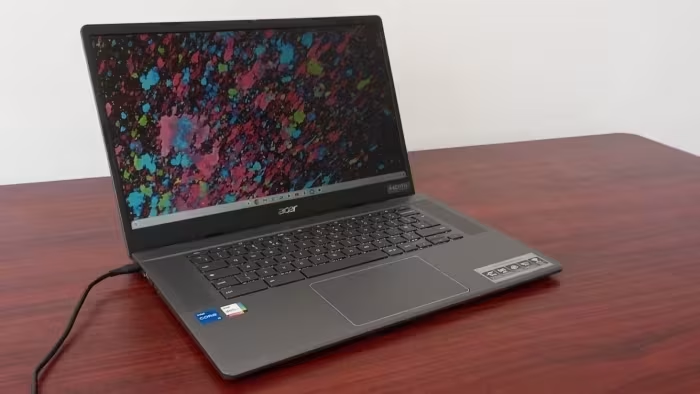
Acer Chromebook Plus 515
A performance-focused, budget-friendly 15.6-inch laptop designed for productivity and school tasks under the Chromebook Plus standard.
How This Score Is Calculated
- Sources analysed: 5 reviews
- Explicit scores: 0 sources (sentiment analysis applied)
- Sentiment-only: 5 sources (weighted 1.0×)
- Split: 3 Positive · 2 Mixed · 0 Negative
- Raw weighted average: 7.6
- Formula: Σ(score × weight) ÷ Σ(weight)
- Consensus bonus +0.3: 60% sources agreed
- Final score: 7.6/10 (clamped, rounded to 1 decimal)
Algorithmically calculated from source data. No manual adjustments.
- Most reviewed featurePerformance (5/5)
- Most praisedPerformance
- Most criticisedDisplay Brightness
- Reviewer consensus levelModerate
- Value for moneyExcellent Value (8.5/10)
The Acer Chromebook Plus 515 is widely regarded as a high-performance, budget-conscious workhorse that effectively leverages the Chromebook Plus standard to deliver a superior ChromeOS experience. It excels in raw speed and productivity, though it makes compromises in display brightness, keyboard tactility, and overall portability. It serves as an ideal choice for students and office workers who prioritize value and performance over premium display features or extreme mobility.
🔧 Key Specifications
Specifications sourced from reviewer mentions. Verify with manufacturer for complete details.
- Display: 15.6-inch, 1080p resolution
- Storage: UFS storage
- Webcam: 1080p
- Connectivity: Wide array of ports, HDMI 1.4
- Build: Plastic construction
💲 Price Range
₹33,300 — ₹53,000
Prices sourced from reviews. Check current retailer pricing.
📊 What Reviewers Say — Feature by Feature
5 features evaluated across 5 sources.
👍 Key Strengths
- Fast, snappy performance
- High-quality 1080p webcam
- Excellent value for money
- Wide array of ports
- Responsive large touchpad
👎 Key Weaknesses
- Dim display brightness
- Mushy, non-backlit keyboard
- Average battery life
- Limited professional software support
- HDMI 1.4 port limitation
💰 Value for Money Analysis
Reviewers consistently identify the device as a top-tier value proposition for its budget-friendly price point. It is praised for offering performance that makes it a viable alternative to more expensive Windows notebooks.
5 of 5 sources commented on price or value.
⚡ Where Reviewers Disagreed
The following areas saw meaningful disagreement across sources.
- Keyboard Quality: 1 source praised its ergonomics, while 2 sources specifically criticised it as being mushy or shallow. The disagreement likely stems from subjective typing preferences and varying expectations for laptop keyboard feedback.
🎯 Who This Product Is For
Reviewer recommendations for different target audiences and use cases.
🛠️ Best Use Cases
- Productivity TasksThe fast CPU and UFS storage make it excellent for everyday work tasks.Great
- Video ConferencingThe 1080p webcam provides superior clarity for calls compared to standard laptop cameras.Great
- Mobile ComputingIts size and plastic build make it less ideal for frequent travel compared to compact alternatives.OK
🔀 Alternatives Mentioned by Reviewers
Maximise this list. Include EVERY single competitor, rival, or alternative product mentioned in any of the source reviews. Do not omit any. More alternatives and longer lists are better.
- ASUS Chromebook Plus CX34 — Reviewers note the Acer 515 offers a better keyboard and longer battery life than this model, though the ASUS is considered more portable.
- Acer Chromebook 516GE — A more expensive alternative that offers superior connectivity, CPU power, and display quality for users who need more than the 515 provides.
- Asus Chromebook Vibe CX34 Flip — Compared directly, the Acer 515 offers similar performance but lacks the premium flexibility/build features of this more expensive model.
- Acer Chromebook Spin 714 — A faster, more premium device that outclasses the 515 in performance and features, recommended for users who can afford a higher price point.
- Standard Celeron-based Chromebooks — The 515 is explicitly recommended as a significant performance upgrade over these entry-level, slow budget machines.
Alternatives sourced exclusively from reviewer mentions.
🛒 Buyer's Guide
✅ Buy This If…
- You need a high-performance productivity machine on a budget.
- You prioritize high-quality webcams for video conferencing.
- You primarily work from a single location and don't need maximum portability.
❌ Skip This If…
- You require a bright, vibrant display for creative work.
- You need a backlit keyboard for working in low-light environments.
- You are a power user requiring professional-grade software support.
The Acer Chromebook Plus 515 is an outstanding value-for-money proposition that delivers where it counts: performance and basic usability. While it suffers from a dim screen and a mediocre keyboard, its snappy processor and excellent webcam make it a reliable tool for students and office workers. If you need a simple, fast workhorse for productivity, this is a top choice, provided you don't need a premium display.
Top Alternative: Acer Chromebook Spin 714 — Choose this if you need higher performance and a better build and are willing to pay more.
PLG_CONTENT_IMAGEGALLERY_ERROR_NO_IMAGES
Reviewer Perspectives & Source Breakdown
Acer Chromebook Plus 515 review: A sturdy device that excels at producti...
Price: Approximately ₹33,000
The Acer Chromebook Plus 515 provides excellent performance and value for productivity, despite its dull design and dim display. It is a solid, professional-focused machine that successfully delivers on the new Chromebook Plus standards.
Pros
- Great temporal noise reduction for webcams
- Improved overall system performance
- Effective upward-firing speakers
Cons
- Lacks backlighting for the keyboard
- Display is dim at only 250 nits
- Uninspired and boring aesthetic design
Acer Chromebook Plus 515 (2023) Review - RTINGS.com - rtings.com...
The Acer Chromebook Plus 515 is a decent budget laptop for basic productivity and school tasks thanks to its snappy performance and good webcam. However, it is held back by a dim display, short battery life, and a mushy keyboard.
Pros
- Thin and light design
- Large, responsive touchpad
- Decent performance for productivity
- Great 1080p webcam
- Loud speakers
Cons
- Dim display
- Slightly mushy keyboard
- Soldered RAM
- Limited professional software support
- No Thunderbolt 4 support
Acer Chromebook Plus 515 review | IT Pro - itpro.com...
The Acer Chromebook Plus 515 is a robust, business-ready workhorse that offers impressive performance and solid ergonomics for its budget-friendly price. While not the most portable option, it excels as a reliable productivity device for users who primarily work in one location.
Pros
- Good performance
- Respectable 15.6-inch 1080p screen
- Excellent usability and ergonomics
- Solid build quality
Cons
- Basic connectivity options
- Not the most portable Chromebook
Acer Chromebook Plus 515 Review | PCMag - pcmag.com...
Price: ₹33,300
The Acer Chromebook Plus 515 is an impressive, budget-friendly device that significantly outperforms previous generation Chromebooks. While it features a few minor compromises, its solid hardware and feature set make it a strong value proposition.
Pros
- Low price point
- Considerably improved ChromeOS experience
- Strong CPU and UFS storage performance
- Wide array of available ports
- Quality 1080p webcam
Cons
- Screen could be brighter
- Shallow, non-backlit keyboard
- HDMI 1.4 port limitation
Acer Chromebook Plus 515 review: Plus goes big | Expert Reviews - expert...
Price: ₹53,000
The Acer Chromebook Plus 515 is an excellent, speedy workhorse that excels at productivity tasks despite having a display that lacks brightness and average battery life. It stands out as a top-tier choice for those on a £500 budget.
Pros
- Useful Chromebook Plus software enhancements
- Ample performance for productivity
- Impressive speaker sound quality
Cons
- Screen lacks necessary brightness
- Average battery life
- Plastic build feels slightly budget
Acer Chromebook Plus 515 review: A capable laptop at a bargain price...
If you're happy to forego Windows and Mac software, the Acer Chromebook Plus 515 offers excellent value with its fast performance, sharp Full HD display, durable build, and conformity to Google's Chromebook Plus standards, all at an affordable price point. While not a touchscreen, it's still a capable and budget-friendly Chromebook that's ultimately all about value.
Pros
- Value for money
- Fast performance
- Sharp and clear display
Cons
- Not a touchscreen
- Only 1080p resolution
- Chromebooks aren't for everyone