Asus ExpertBook P5 Review
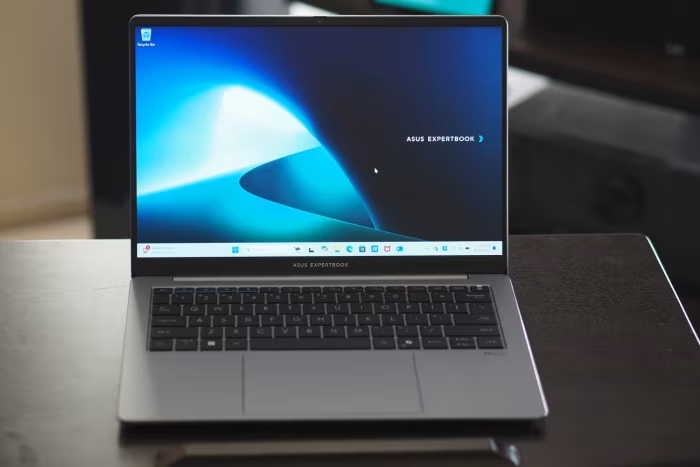
Asus ExpertBook P5
A durable, business-focused ultraportable laptop by Asus featuring Intel Lunar Lake architecture and robust professional security features.
How This Score Is Calculated
- Sources analysed: 27 reviews
- Explicit scores: 14 sources (weighted 1.5×)
- Sentiment-only: 13 sources (weighted 1.0×)
- Split: 18 Positive · 6 Mixed · 3 Negative
- Raw weighted average: 7.4
- Formula: Σ(score × weight) ÷ Σ(weight)
- Value sources: 19 of 27 mentioned price or value
- Final score: 7.4/10 (clamped, rounded to 1 decimal)
Algorithmically calculated from source data. No manual adjustments.
- Most reviewed featureBattery Life (24/27)
- Most praisedBattery Endurance
- Most criticisedBuild/Hinge Quality
- Reviewer consensus levelModerate
- Value for moneyGood Value (7.6/10)
The Asus ExpertBook P5 is a highly practical, business-oriented workhorse that impresses with its exceptional battery life and efficient Lunar Lake performance. While it targets the professional market with robust security and a durable, MIL-STD 810H certified chassis, reviewers noted inconsistencies in build rigidity and keyboard feel. It is widely regarded as a dependable, value-driven choice for office productivity and mobile professionals, though it lacks the premium aesthetic and color-accurate displays found in higher-end ultrabooks.
🔧 Key Specifications
Specifications sourced from reviewer mentions. Verify with manufacturer for complete details.
- Processor: Intel Core Ultra 7 258V
- Display: 14-inch 2.5K IPS, 144Hz, matte finish
- Brightness: 300–400 nits
- Battery: 63 Wh
- Charging: Fast charging supported
- Main Camera: 1080p with privacy shutter
- OS: Windows 11
- Wi-Fi: Wi-Fi 6E (No Wi-Fi 7)
- Dimensions: Lightweight portable
- Build Materials: Aluminum chassis
💲 Price Range
Approximately ₹83,500 – ₹1,53,000
Prices sourced from reviews. Check current retailer pricing.
📊 What Reviewers Say — Feature by Feature
12 features evaluated across 27 sources.
👍 Key Strengths
- Exceptional battery life
- High-refresh 144Hz display
- Durable, professional chassis
- Useful AI-powered meeting tools
- Expandable SSD storage
👎 Key Weaknesses
- Inconsistent chassis/hinge build
- Mushy keyboard and trackpad
- Limited multi-core performance
- No OLED display option
- Lack of Ethernet/SD ports
💰 Value for Money Analysis
Reviewers generally view the ExpertBook P5 as an excellent value proposition for the enterprise segment. Its pricing is considered competitive when weighed against the included 3-year warranty and robust build.
19 of 27 sources commented on price or value.
⚡ Where Reviewers Disagreed
The following areas saw meaningful disagreement across sources.
- Build Quality: 12 sources praised the rugged/sturdy aluminum chassis, while 6 sources specifically criticised 'plasticky' feel, hinge wobble, and sharp edges.
🎯 Who This Product Is For
Reviewer recommendations for different target audiences and use cases.
🛠️ Best Use Cases
- Office ProductivityExcellent for multitasking, document editing, and web-based tasks thanks to stable performance.Great
- Virtual MeetingsHighly effective due to AI-driven noise cancellation and transcription features.Great
- Mobile WorkPerfect for travel with its lightweight, MIL-STD 810H durable design.Good
🔀 Alternatives Mentioned by Reviewers
Maximise this list. Include EVERY single competitor, rival, or alternative product mentioned in any of the source reviews. Do not omit any. More alternatives and longer lists are better.
- Dell XPS 14 — A more premium, sleek, and polished alternative that offers superior build materials but comes at a higher price point.
- Apple MacBook Pro 14 — Frequently cited as the gold standard for build quality and performance, though it operates on a different OS ecosystem.
- Venom BlackBook Zero — A direct competitor that offers higher raw rendering power, though it sacrifices the battery efficiency found in the P5.
- Acer Swift Go 14 AI — Comparable in the AI-laptop segment but noted to have inferior battery endurance compared to the P5.
- MacBook Air M3 — Referenced for its superior benchmark performance and portability, though it lacks the port variety of the ExpertBook.
- HP EliteBook Ultra G1q — A business-class rival often compared for its design, though the P5 is noted for better x86 app compatibility.
- Dell Latitude 7455 — A direct enterprise competitor that often outperforms the P5 in multi-threaded benchmarks.
Alternatives sourced exclusively from reviewer mentions.
🛒 Buyer's Guide
✅ Buy This If…
- You need an all-day battery laptop for office tasks.
- Professional durability and security features are your top priority.
- You want a high-refresh-rate, non-glare display for long work hours.
- You require expandable storage for future upgrades.
❌ Skip This If…
- You are a professional content creator needing high color accuracy.
- You require heavy-duty multi-threaded performance for rendering.
- You demand a premium, 'unibody' metal feel with zero chassis flex.
⚠️ Things to Check Before Buying
- Verify that your specific work software does not require dedicated Ethernet or SD card readers.
- Be aware that the RAM is soldered and not user-upgradeable.
- Check if your local region offers the 3-year warranty, as this is a major value driver.
The Asus ExpertBook P5 is a dependable business companion that prioritizes battery life and practical connectivity over flashy aesthetics. While it isn't the most premium-feeling laptop in its class, its combination of MIL-STD durability, solid security, and efficient Lunar Lake performance makes it a smart buy for professionals. It is an ideal tool for standard office productivity and mobile work. If you need top-tier build materials, consider the Dell XPS 14, but for pure business value, the P5 is hard to beat.

Reviewer Perspectives & Source Breakdown
asus expertbook p5 review p5405csa series intel lunar lake ProsCons...
This Asus ExpertBook P5 is a solid mid-range laptop for general use, for work and school and regular activities. Unlike the consumer Vivobook and Zenbook Asus models, this comes with a few extras in terms of durability standard, software tweaks, and a few design and ergonomics particularities. Reinforced ports, a 180-hinge with an matte IPS display, balanced performance and cooling, and a fair price are among its main selling points. At the same time, a Lunar Lake notebook isn't necessarily the right choice for anyone, and you should keep in mind that this is merely a mid-range chassis and not a premium product.
Pros
- good design and ergonomics in the mid-range segment
- plenty of ports
- IPS matte display with 180 hinge
- solid performance for daily-use and multitasking
- excellent GPU capabilities for this class
- 63 Wh battery and long runtimes
- competitively priced
Cons
- the IPS display is 100% sRGB only
- rather noisy keyboard
- camera quality could be better
Page 4 of 4